
Jira is one of the most powerful and widely used platforms for managing work, especially for Agile and software development teams. However, while Jira provides strong foundations—such as Scrum and Kanban boards, workflows, and issue tracking—it often requires additional capabilities to support advanced planning, resource management, portfolio visibility, reporting, and governance. This is where Jira project management apps come in.
In this article, you’ll learn how to choose the right Jira project management solution for your team and explore an in-depth overview of the top 10 best Jira apps for project management.
What Are Jira Project Management Apps?
Jira project management apps (also called add-ons, plugins, or extensions) are third-party applications available through the Atlassian Marketplace. These apps extend Jira’s functionality beyond its native features and allow teams to tailor Jira to their exact operational needs.
While Jira provides strong foundations—Scrum boards, Kanban boards, workflows, and issue tracking—apps enable advanced capabilities such as:
- Advanced resource planning: Visualizing team capacity, balancing workloads, and forecasting availability across multiple projects.
- WBS and Gantt charts: Transforming Jira issues into structured Work Breakdown Structures and timeline-based plans with dependencies and critical paths.
- Time tracking and invoicing: Managing billable vs non-billable work, approvals, cost tracking, and professional services reporting.
- Advanced reporting and analytics: Building dashboards and reports that go far beyond Jira’s native reporting.
- Quality assurance and test management: Managing test cases, executions, and coverage directly within Jira issues.
In short, Jira apps allow organizations to build a complete project, program, and portfolio management environment without leaving Jira.
How to Choose the Best Project Management Tool
Selecting the right PM tool requires a structured approach. The goal is fit, not feature overload.
Step 1: Identify Your Current Problems
Before looking at tools, clearly define the problems you are trying to solve.
Common pain points include:
-
too many unproductive meetings,
-
lack of communication between teams or departments,
-
overflowing email inboxes,
-
uneven workload distribution,
-
disorganized projects and missed deadlines.
Write these issues down. This list becomes the foundation for your feature requirements.
At the same time, assess your delivery methodology:
-
Agile (Scrum, Kanban),
-
Waterfall,
-
or a hybrid approach.
Not all tools support every methodology equally well, so this step is critical.
Step 2: Define Selection Criteria
Beyond pain points, you must define practical constraints and expectations, such as:
-
available budget,
-
team size and expected growth,
-
scalability requirements,
-
integration needs (CRM, HR, finance, collaboration tools),
-
file storage and reporting needs,
-
security and compliance requirements,
-
Cloud vs Data Center / on-premise deployment.
This is often the hardest step—but also the most important. Without clear criteria, teams frequently end up switching tools repeatedly.
Step 3: Research Available Project Management Tools
Once requirements are clear, you can start researching solutions. Common approaches include:
-
conducting independent research (time-consuming),
-
asking peers or other project managers,
-
reading blogs, reviews, and watching demos,
-
or working with experienced consultants.
Engaging experts can significantly reduce risk. They help narrow down options, identify hidden limitations, and prevent costly mistakes.
Step 4: Test the Tool in Real Conditions
Almost all modern PM tools offer free trials (typically around 30 days). Use this time wisely.
Best practices:
-
create a small pilot team with diverse roles,
-
test the tool on a real (but controlled) project,
-
validate key workflows: planning, reporting, resourcing, and collaboration,
-
evaluate performance and usability under real conditions.
In addition to hands-on testing, book a product demo with the vendor. A guided demo helps you understand best practices, explore advanced use cases, and assess how well the tool fits your requirements.
If more time is needed, do not hesitate to request a trial extension—especially for complex tools or multi-team evaluations. Finally, use the trial period to assess customer support quality, as responsive and reliable support is critical during onboarding and long-term use.
Step 5: Gather Team Feedback
After the trial, collect structured feedback from users. Useful questions include:
-
Did the tool improve or slow down your workflow?
-
What features were most and least valuable?
-
How easy was onboarding?
-
How much maintenance effort is required?
-
Is the pricing justified?
-
Would you recommend this tool?
Team buy-in is essential. A tool that looks great on paper but lacks user acceptance will ultimately fail.
Step 6: Make the Final Decision
Return to your original list of pain points and requirements.
-
If the tool meets the criteria and has team approval, proceed with purchase and implementation.
-
If not, return to research and test the next candidate.
Choosing the right tool is an investment—taking time here prevents long-term inefficiencies.
Top 10 Best Jira Apps for Project Management
For teams already using Jira, extending its functionality with specialized apps is the most efficient path to an all-in-one PM solution. While the “best” is subjective, the following are top-rated apps that significantly enhance Jira’s project management capabilities.
1. TeamBoard ProScheduler
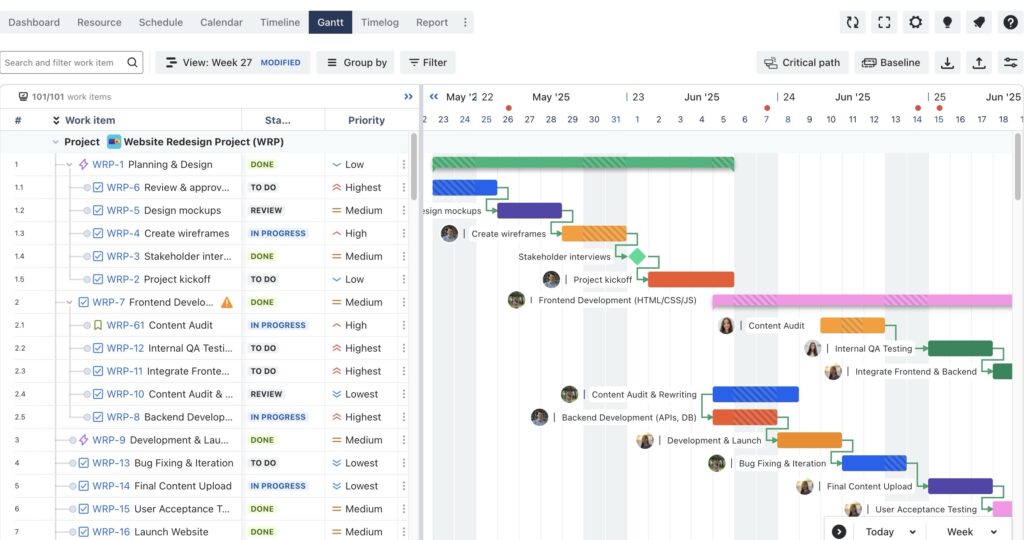
TeamBoard ProScheduler is a comprehensive project and portfolio management (PPM) solution for Jira, designed to consolidate planning, scheduling, and resource management into a single visual platform.
Key Features
- WBS-Style Gantt Charts: Supports a Work Breakdown Structure (WBS) to visualize Jira hierarchies, manage parent–child relationships, and monitor real-time progress across all levels of work.
- Task Dependencies & Auto-Scheduling: Teams can define dependencies (such as Finish-to-Start) directly in the Gantt view. When tasks move, timelines are automatically recalculated to reflect downstream impact.
- Critical Path & Baselines: Highlights the critical path—the sequence of tasks that determines the project end date—and allows teams to set baselines to compare original plans with real-time progress.
- Resource Workload & Capacity Planning: A visual workload heatmap shows how work is distributed across individuals and teams, helping managers identify overloads and underutilization early.
- Multi-Project & Program Management: The Program Board enables planning across multiple Jira projects in one unified view, supporting portfolio-level coordination.
Use Case
Ideal for project and program managers who need to plan across multiple Jira projects, identify the critical path, and balance resources across the portfolio to prevent burnout and delivery risks.
2. Structure.Gantt (Tempo)
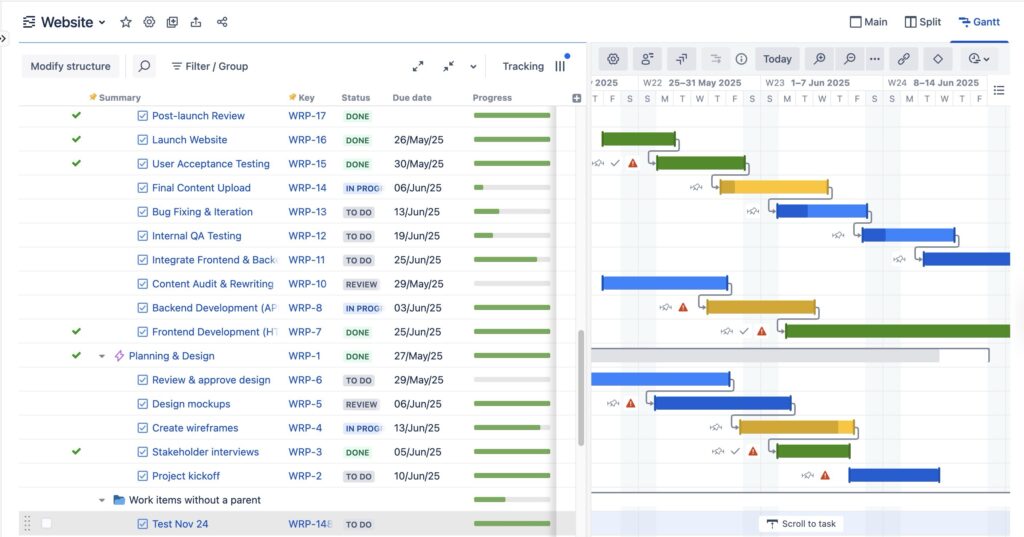
Structure.Gantt is a project planning extension for Jira that adds powerful Gantt chart capabilities on top of the Structure hierarchy engine.
Key Features
- Hierarchy-Based Gantt Planning: Automatically visualizes existing Jira hierarchies (Initiatives → Epics → Stories → Sub-tasks) on a timeline without manual setup.
- Real-Time Rollups: Aggregates dates, progress, and effort across hierarchy levels to provide accurate top-down visibility.
- Dependency & Schedule Management: Supports multiple dependency types (Finish-to-Start, Start-to-Start, etc.) and automatically reschedules downstream work when changes occur.
- Cross-Project Views: Allows issues from multiple Jira projects to be displayed in a single Gantt view, enabling portfolio-level planning.
Use Case
Best for portfolio and program managers who need to consolidate work from multiple Jira projects into one dynamic, hierarchy-driven timeline.
3. BigPicture – Portfolio & Resource Management
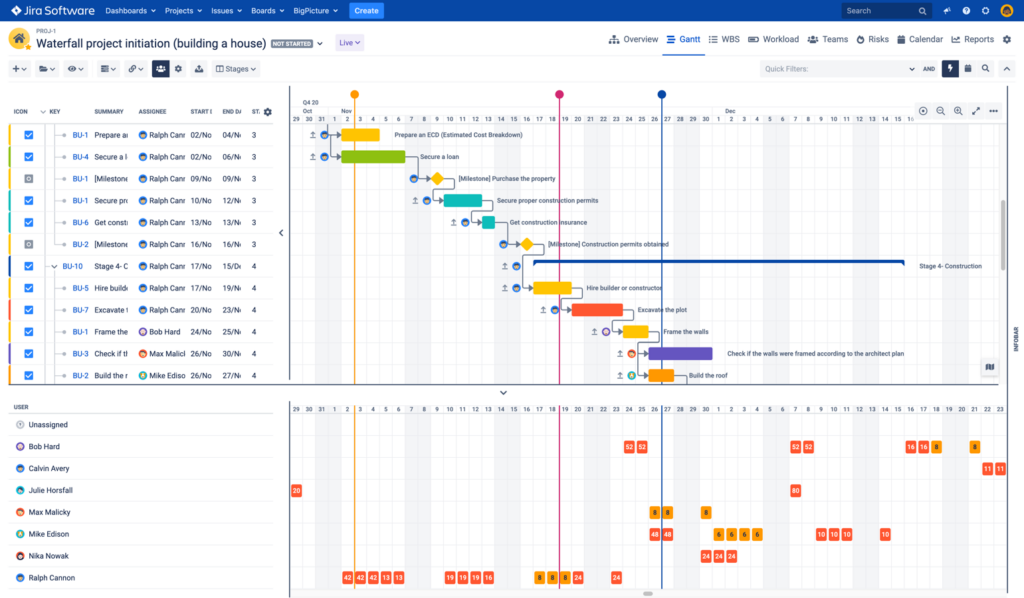
BigPicture is an enterprise-grade project and portfolio management (PPM) solution for Jira, designed for large organizations managing complex, large-scale initiatives.
Key Features
- Advanced Gantt Charts & Roadmaps: Provides centralized planning for tasks, milestones, dependencies, and critical paths across programs and portfolios.
- Resource Pool & Capacity Management: Offers real-time visibility into workloads across teams and projects, including company-wide and portfolio-level capacity views.
- Hybrid Methodology Support: Supports Agile (including SAFe and LeSS), Waterfall, and hybrid delivery models within the same portfolio using flexible “Boxes.”
- Risk & Dependency Management: Includes risk matrices, PI-planning constructs, and early detection of cross-project conflicts and delivery risks.
Use Case
Ideal for enterprise PMOs and large organizations managing shared resources, multiple programs, and mixed delivery frameworks.
4. TeamBoard TimePlanner
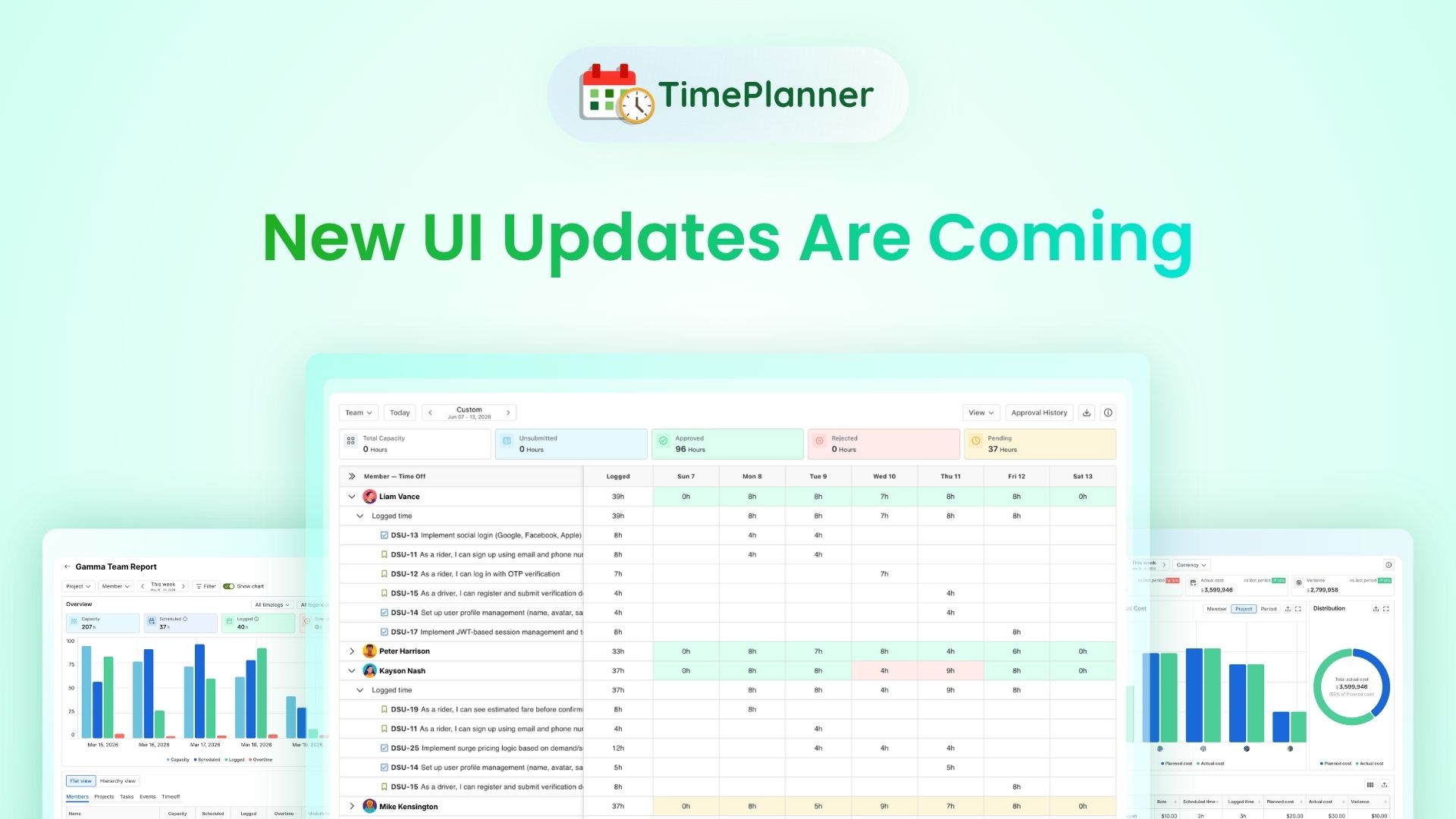
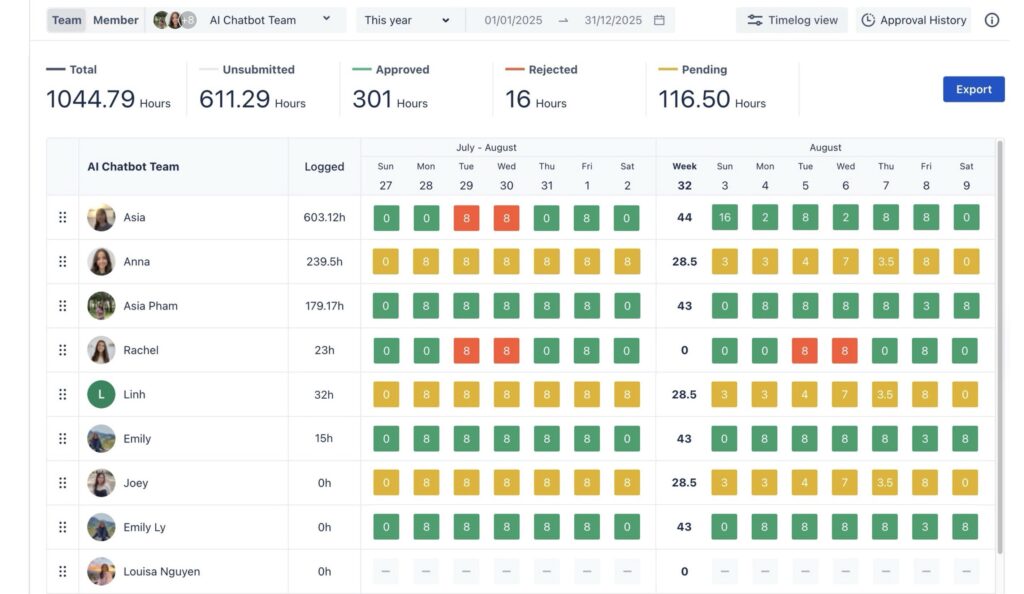
TeamBoard TimePlanner is a Jira-native time, cost, and utilization management app designed to transform basic work logs into a structured system for financial tracking and capacity management.
Key Features
- Structured Timesheets & Approvals: Introduces formal timesheet submission and approval workflows, ensuring time data is accurate, auditable, and compliant.
- Financial & Billing Management: Supports resource-based, role-based, or project-based billing rates, enabling clear tracking of billable vs. non-billable work and real-time project costs.
- Resource & Leave Planning: Provides a visual schedule for managing vacations, public holidays, and non-project time, ensuring availability is reflected in capacity calculations.
- Utilization & Cost Reporting: Delivers dashboards for utilization rates, cost vs. budget tracking, and client billing reports.
Use Case
Best for professional services teams and PMOs that require accurate time tracking, billing control, and utilization insight tightly integrated with Jira.
5. Easy Agile Roadmaps
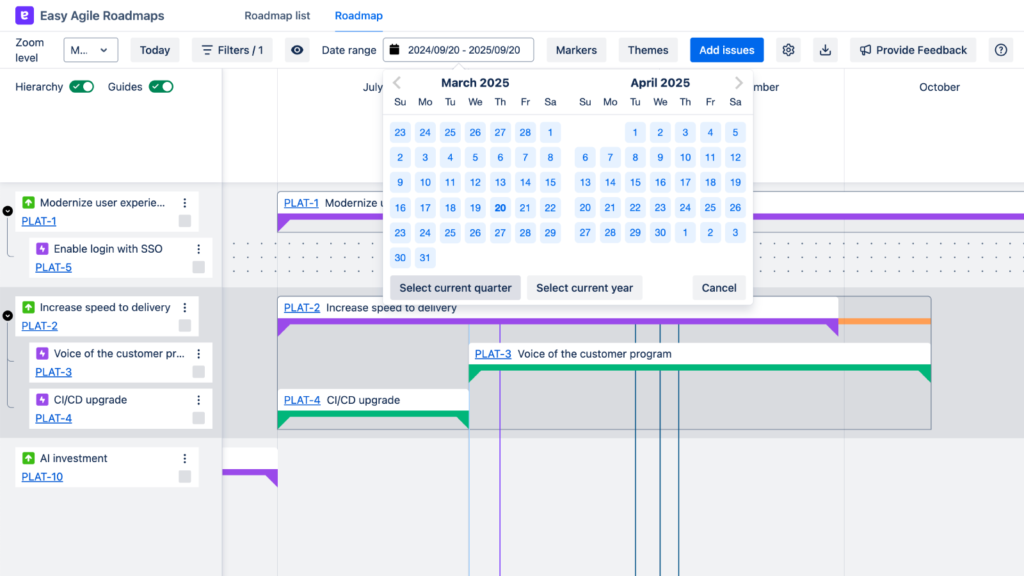
Easy Agile Roadmaps is a Jira app focused on simple, visual roadmap planning that helps teams communicate direction, priorities, and progress without introducing heavy project management complexity.
Key Features
- Drag-and-Drop Interface: Users can visually sequence work by dragging and dropping Jira issues directly onto a timeline, adjusting start and end dates with minimal effort.
- Theme & Team Swimlanes: Organize the roadmap into high-level “themes” or specific team tracks to group work items and show how they align with broader outcomes.
- Cross-Team Dependency Visualization: Clearly identify how work items across different boards or teams interact, using visual markers to spot potential scheduling conflicts before they occur.
- Real-Time Jira Synchronization: Every change made on the roadmap—such as moving an issue or updating a version—automatically updates the corresponding Jira issue, ensuring data remains consistent.
- Stakeholder-Ready Exports: Create snapshots of the roadmap in PDF or PNG format to share with stakeholders who do not have access to Jira.
Use Case
Best for product managers, delivery leads, and agile teams who need high-level planning and clear visual roadmaps to align stakeholders and teams—without the overhead of detailed scheduling, resource planning, or complex PMO tooling.
6. Jira Native Roadmaps / Plans
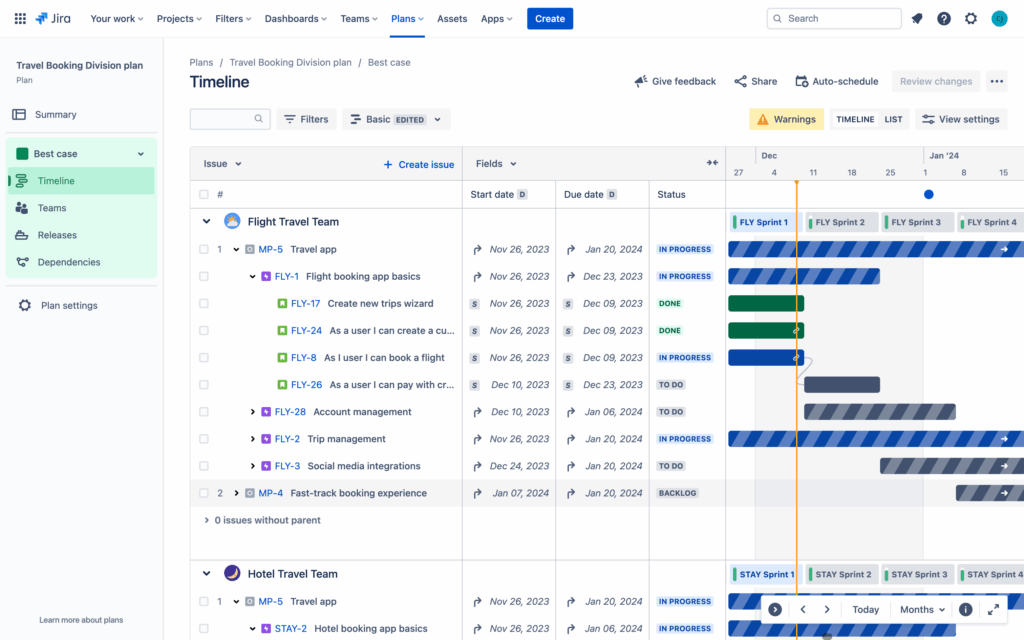
Advanced Roadmaps, integrated into Jira as the “Plans” feature, is a core capability of Jira Software Premium and Enterprise. In 2025, it remains a key tool for organizations needing portfolio-level planning and cross-team coordination within Jira.
Key Features
- Cross-Project & Cross-Team Planning: Aggregates work from multiple boards, projects, and filters into a single, unified roadmap.
- Dependency Management: Visualizes dependencies across teams to identify blockers and understand delivery impact early.
- Capacity Planning: Aligns planned work with team velocity and sprint capacity, with enhanced insights to support better resource allocation.
- Scenario Planning: Supports “what-if” modeling to test delivery options without affecting live plans.
- Advanced Hierarchy: Enables hierarchy levels above Epics (such as Initiatives or Themes) to track strategic goals.
Use Case
Best for teams using Jira Premium or Enterprise that need portfolio-level visibility and strategic planning without adding third-party apps.
7. eazyBI Reports and Charts
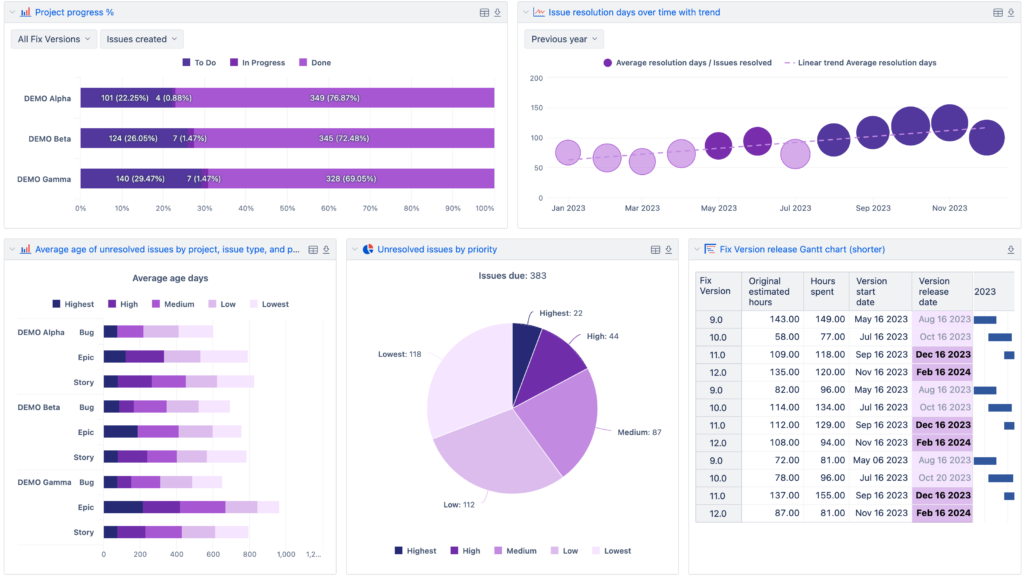
eazyBI is a powerful business intelligence (BI) and reporting tool that extends Jira’s native reporting with advanced analytics, dashboards, and data modeling.
Key Features
- Advanced Calculations (MDX): Supports Multi-Dimensional eXpressions (MDX) to build complex metrics, KPIs, and custom calculations beyond standard Jira reports.
- Multi-Source Data Import: Combines Jira data with external sources such as CSV files, SQL databases, or REST APIs for holistic reporting.
- Custom Dashboards & Drill-Downs: Creates interactive dashboards with drill-down capabilities for both executive-level overviews and detailed team analysis.
Use Case
Best for PMOs, analysts, and executives who need deep insights into project performance, trends, velocity, and organizational KPIs that Jira’s built-in reports cannot provide.
8. Xray Test Management
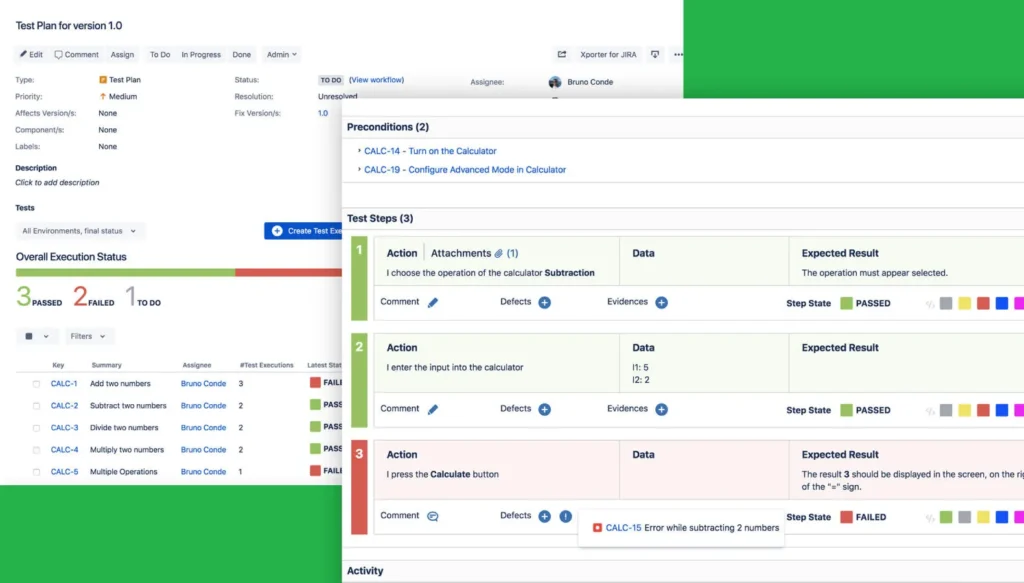
Xray is a native Jira test management application that integrates quality assurance directly into the Jira issue lifecycle.
Key Features
- Test Management in Jira: Create and manage test cases, test plans, and test executions using standard Jira issue types.
- Requirements Coverage & Traceability: Link tests to user stories and epics to ensure full coverage and visibility across requirements.
- CI/CD & Automation Integration: Integrates with automation tools such as Cucumber, JUnit, and Selenium to track automated test results within Jira.
Use Case
Ideal for software development and QA teams that want to manage requirements, development, and testing in one unified Jira-based platform.
9. ScriptRunner for Jira
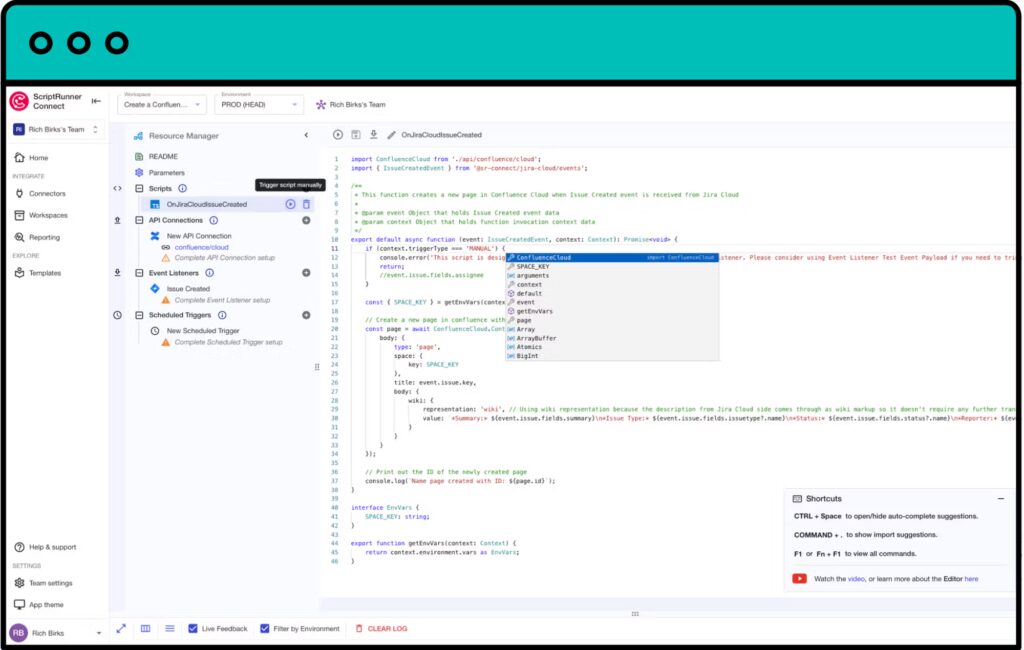
ScriptRunner is an advanced automation and customization tool that extends Jira’s capabilities through scripting.
Key Features
- Scripted Fields: Create dynamic custom fields whose values are calculated automatically using scripts.
- Advanced Workflow Customization: Implement complex workflow validators, conditions, and post-functions that go beyond Jira’s native configuration.
- Extended JQL Functions: Enhance Jira Query Language (JQL) with custom functions for advanced searching and reporting.
Use Case
Best for Jira administrators and advanced users who need to implement complex business logic, automation, or custom behaviors not supported by standard Jira features.
10. Tempo Timesheets
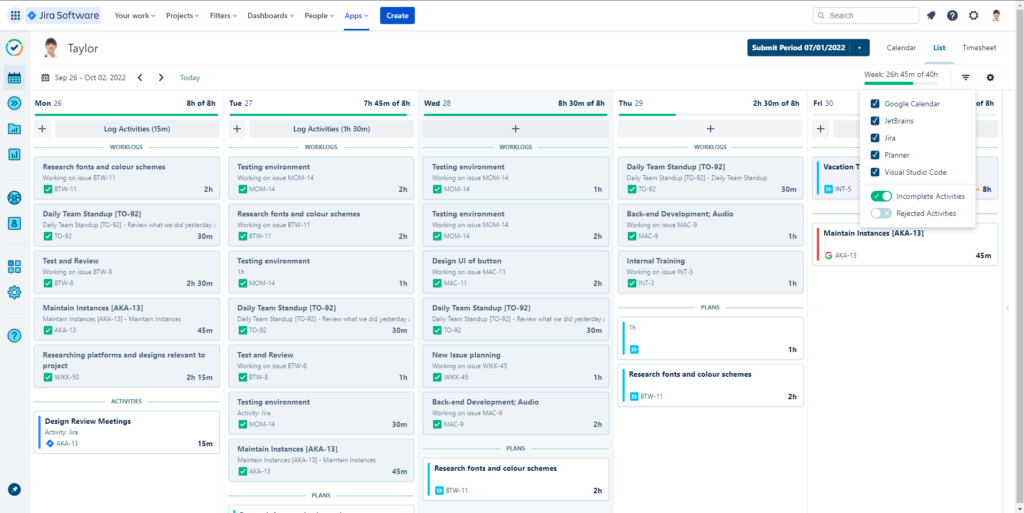
Tempo Timesheets is an industry-leading time tracking and timesheet management solution for Jira, widely used by organizations that require accurate, auditable effort data for billing, payroll, and cost control. It extends Jira’s basic work logs into a structured system that supports approvals, reporting, and financial accountability.
Key Features
- Effort Logging: Enables quick and intuitive work logging through calendar or list views, making it easy for users to record time accurately with minimal friction.
- Timesheet Approval Workflows: Provides configurable approval processes that allow managers to review, approve, or reject timesheets, ensuring compliance and data accuracy.
- Billing & Cost Reporting: Generates precise reports for client invoicing, internal cost analysis, and project-level effort tracking, supporting integration with finance and payroll systems.
Use Case
Best suited for professional services organizations (PSOs), consulting firms, and delivery teams that need to track billable time against client projects or internal cost centers while maintaining audit-ready records within Jira.
Conclusion
Jira is a powerful foundation, but its true strength lies in its ecosystem. By selecting the right combination of Jira project management apps, organizations can scale from issue tracking to full project, program, and portfolio management.
The key is not choosing the most popular app—but choosing the one that aligns with your delivery model, planning depth, reporting needs, and team maturity. With a structured selection process and real-world testing, Jira can become a single source of truth for planning, execution, and decision-making.