
Resource capacity planning is crucial for making sure you allocate the right resources to the right tasks at the right time. If done effectively, it can be the difference between a project that stays on track and one that spirals out of control. As a project manager, you need to ensure that your team is neither overburdened nor underutilized, helping to maintain morale and project momentum.
In this article, we’ll discuss the best practices for managing resource capacity across various phases, share tips and tricks for optimizing your processes, and highlight how TimePlanner can assist you in this vital task.
What is resource capacity planning?
Resource capacity planning involves identifying, allocating, and managing resources (e.g., people, equipment, and materials) in a way that meets project demands. It helps you forecast resource needs, track their availability, and ensure that your team can handle the workload without burnout.
Effective resource capacity planning ensures that projects are completed on time and within budget. It helps prevent over-allocating resources, which can lead to burnout and missed deadlines, and under-allocating, which leads to inefficiencies and missed opportunities.
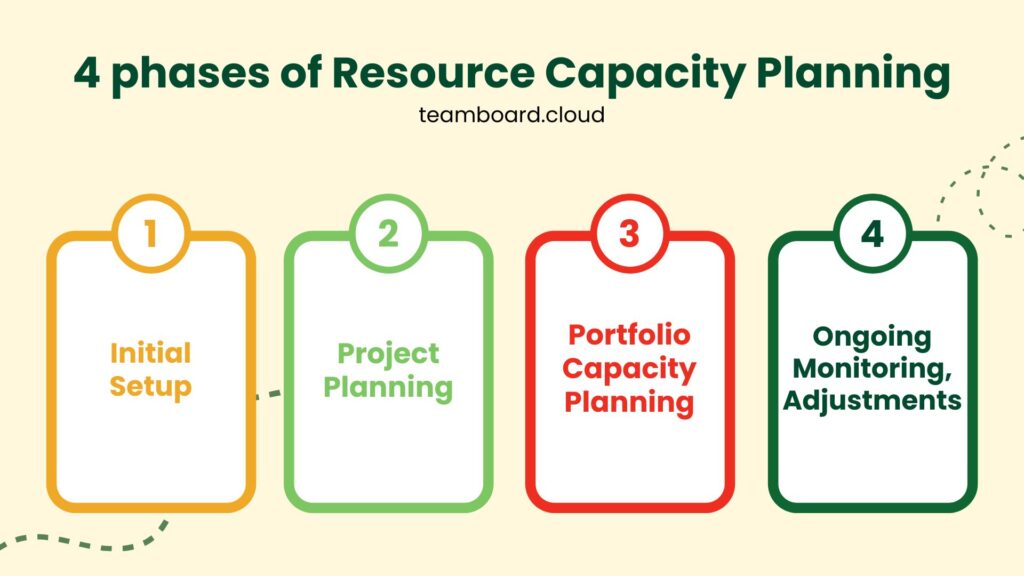
Resource capacity planning typically occurs in four key phases:
- Initial setup: Defining resource pools and collecting necessary data to understand resource availability.
- Project planning: Planning resources at the project level and involving the team in the estimation process to ensure accuracy.
- Portfolio capacity planning: Aggregating resource data across multiple projects to evaluate overall capacity and prevent bottlenecks.
- Ongoing monitoring and adjustments: Continuously tracking and shifting resources as real-time needs evolve.
Best practices for resource capacity planning in the initial setup
The initial setup phase is where everything begins, and a good start can set the project on a path toward success. Here are the best practices to manage resource capacity for this phase.
1. Define resource pool
Before beginning a project, it’s important to define the resources available to you. This can include both human resources and technical resources (such as software, hardware, etc.).
Additionally, you should identify each resource’s skill set, work schedule, and availability. This is crucial for ensuring that each team member is assigned tasks within their capacity and skill level.
2. Determine resource availability
It’s essential to assess how much time each resource can realistically contribute to the project. This includes accounting for non-project work such as meetings, training, or other organizational responsibilities.
Additionally, resource managers should be clear about their team’s availability throughout the project lifecycle to avoid overallocating resources.
3. Data granularity
Resource planning should be done using appropriate data granularity. Many project managers make the mistake of overcomplicating the planning process by collecting too much detailed data.

Monthly or quarterly capacity data can often be sufficient, especially during early planning stages. On the other hand, too much detail might overwhelm the planning process and slow things down.
4. Account for historical data
When possible, draw insights from historical data. You can look at past projects to assess how resources were utilized. Identify patterns in resource demand and supply.
As a result, this can offer valuable insights into what might work or fail in the current project.
Best practices for effective project planning
Once the initial setup is complete, it’s time for effective project planning. At this stage, your goal is to optimize the use of the resources available.
1. Set a clear project scope
A well-defined project scope is essential for effective resource planning. Before allocating resources, ensure that the project’s goals, deliverables, timeline, and budget are clearly defined.
Besides, a clear scope helps in determining what resources are needed at what stages and ensures that the team is not stretched too thin.
2. Team collaboration
It is recommended to involve your team members in the planning process. By asking for their input on task durations and resource needs, you’ll get a more realistic understanding of what’s possible.
Team members are often best suited to estimate how long tasks will take and what resources they’ll require. This not only helps in making the planning process more accurate but also increases team buy-in and engagement.
3. Prioritize resource allocation
Projects often have multiple tasks, but not all tasks are equally critical. Therefore, you should prioritize the allocation of resources to the most important tasks. This ensures that the resources you have are being used for the highest-priority activities.
If necessary, you can break the project into phases and allocate resources accordingly, ensuring that critical tasks receive the attention they need first.
4. Buffer time
No project is ever without its challenges. Unforeseen issues can arise, causing delays or additional work. It’s important to include buffer time in the project schedule.
This helps to avoid crunch time when unexpected problems arise. Buffer time also ensures that resources are available to manage these unforeseen circumstances without sacrificing other parts of the project.
Best practices in portfolio capacity planning
In larger organizations, projects are rarely isolated. Several projects are often running concurrently, requiring shared resources. Portfolio capacity planning ensures that resources are balanced across multiple projects.
1. Aggregate resource demand across projects
When managing multiple projects, it’s critical to assess resource demand at a portfolio level. You can track which resources are shared between projects and ensure they are not over-utilized.
By consolidating resource demand across all projects, you can better manage your portfolio’s overall capacity.
2. Evaluate resource constraints
Portfolio planning should include a careful evaluation of resource constraints. You should also look for bottlenecks, resource shortages, or over-utilization across multiple projects.
If certain resources are constantly in high demand, it may be time to invest in additional resources or extend deadlines where necessary.
3. Consolidate resource usage
Rather than assigning resources to multiple projects without coordination, it’s best to pool resources together across projects when possible. Shared resources like equipment or specialists should be allocated across projects based on availability and priority.
4. Balance demand and supply
As a project manager, you need to ensure that the overall resource demand does not exceed the supply. If resource demand is consistently higher than availability, you may need to adjust timelines or scope.
Besides, a balanced approach to resource allocation ensures that each project has enough resources without overburdening them.
Best practices for ongoing monitoring and adjustments
Even after the project begins, resource capacity planning isn’t over. Ongoing monitoring and adjustments are essential to ensure that the project stays on track.
1. Track resource utilization
Use tools to regularly monitor how resources are being utilized. Then, you can compare actual resource usage against planned allocations.
This can highlight discrepancies, such as resources being underutilized or overburdened. Regular tracking helps identify issues early on, so they can be addressed before they become bigger problems.
2. Adjust in real-time
Projects often evolve, and so do resource needs. Therefore, you should be prepared to adjust resource allocation based on real-time data.
If a task takes longer than expected or if a new urgent task arises, it’s crucial to be flexible and reassign resources accordingly.
3. Weekly check-ins
Don’t forget to hold regular check-ins to update resource plans and ensure that all team members are on the same page. Weekly reviews help monitor progress, identify resource conflicts, and ensure that tasks are being completed according to schedule.
Tips and tricks for resource capacity planning
Next, we also have some small tricks up our sleeves to keep it streamlined and efficient:
- Maintain flexibility: Always leave room for adjustments in case of unexpected changes in workload or project scope.
- Forecast for the future: Regularly forecast future resource needs based on trends from current and past projects.
- Balance between short-term and long-term: While managing day-to-day resources, ensure there’s enough capacity for long-term strategic goals.
- Know your team’s strengths: Assign tasks based on the skill sets and strengths of individual team members to maximize efficiency.
- Communicate regularly: Keep open lines of communication with all stakeholders to ensure resources are aligned with project goals.
- Leverage resource management tools: Utilize a resource management tool to streamline your planning process and gain real-time insights. Tools like TimePlanner can help manage capacity and track resource allocation efficiently across projects.
How to enhance resource capacity planning with TimePlanner
TimePlanner is a robust resource management tool designed to help project managers allocate resources efficiently. It offers a range of features to help optimize capacity planning.
Additionally, TimePlanner is an excellent resource management tool that can significantly streamline the process of resource capacity planning. By offering a suite of powerful features, TimePlanner helps project managers allocate resources more efficiently, monitor progress, and ensure that teams are never overburdened.
Below are some key features that make resource capacity planning with TimePlanner more effective:
1. Team Capacity Management
TimePlanner allows you to visualize and manage team capacity in real-time. You can easily track the workload of each team member, ensuring that no one is overallocated.
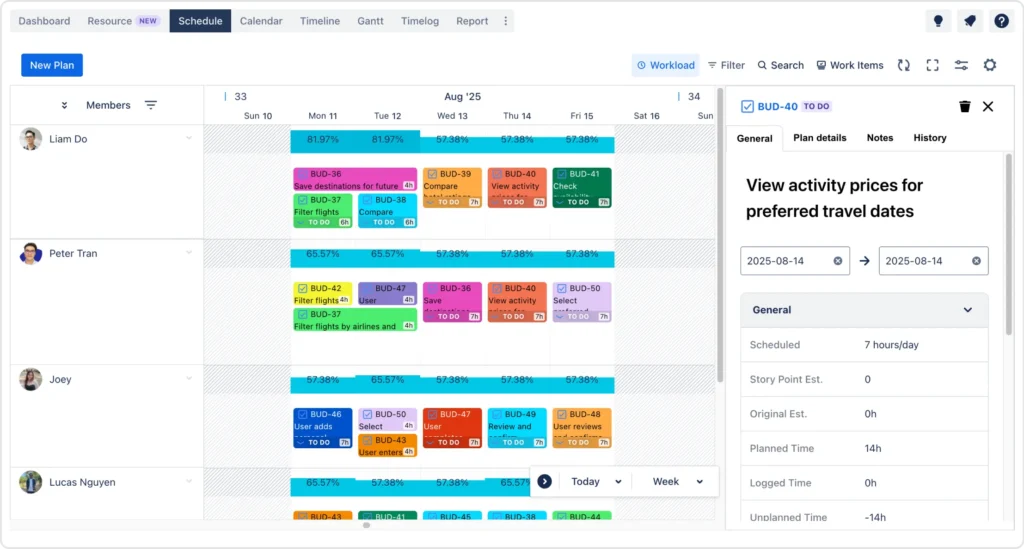
Additionally, the tool provides an intuitive interface that shows who is working on what, how many tasks are assigned, and how much time they have left in their schedule. This makes it easy to distribute tasks evenly across your team, avoid bottlenecks, and ensure that each resource is used optimally.
2. Vacation and Holiday Planning
One of the most common challenges in resource planning is accounting for team members’ vacations and holidays. TimePlanner simplifies this process by integrating vacation and holiday planning directly into the resource management workflow.
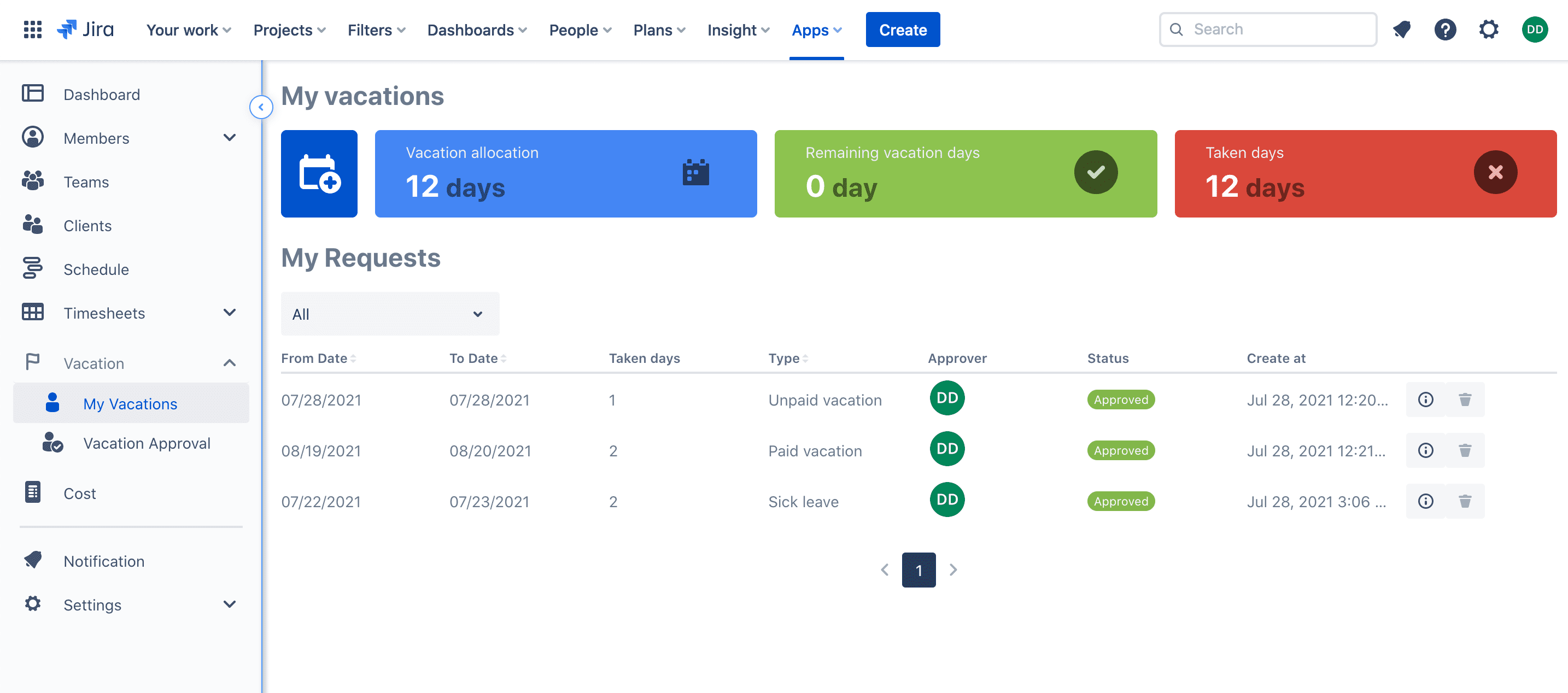
You can also easily mark dates when employees will be unavailable, and the tool automatically adjusts their availability for the project. This feature ensures that resource allocation is more accurate and that you avoid scheduling conflicts during peak vacation periods.
3. Timesheet management with a precise stopwatch timer
TimePlanner offers an integrated timesheet management system that includes a precise stopwatch timer. As a result, this allows team members to track the exact amount of time spent on each task, improving accuracy in reporting and resource allocation.
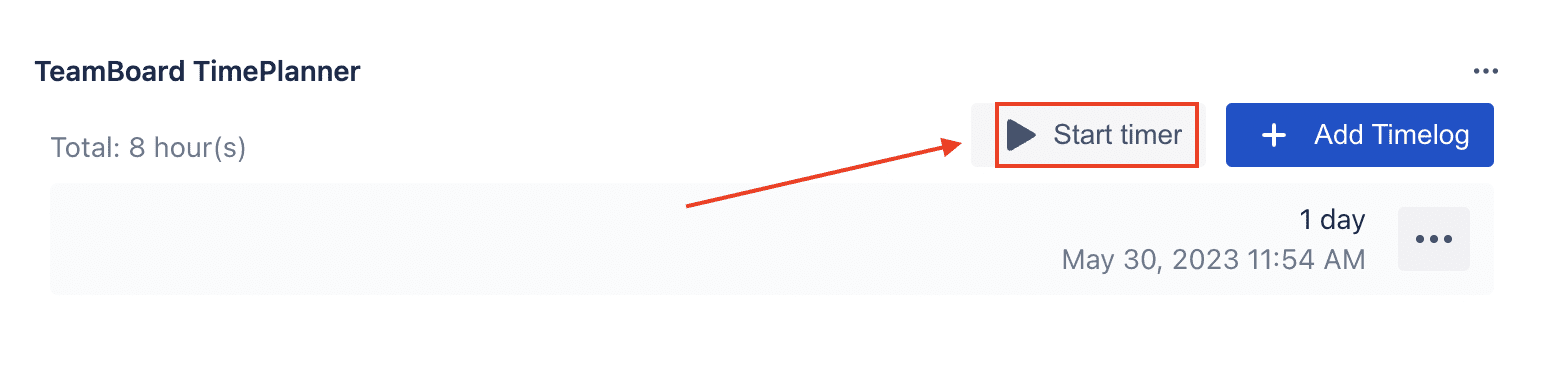
More importantly, this stopwatch feature provides real-time data, allowing project managers to monitor progress more effectively and ensure tasks are completed within the estimated time. Besides, it offers better billing and invoicing, especially for billable work.
4. Simple Leave Approvals
Let’s be real, managing leave requests can be time-consuming, especially when coordinating across different team members. Fortunately, TimePlanner simplifies the leave approval process by allowing managers to easily review and approve or reject leave requests with just a few clicks.

As a result, team members can submit their leave requests directly through the platform, and project managers can quickly assess the impact on the project timeline and resource availability. This feature ensures that leave management is seamlessly integrated into the overall resource capacity planning.
Conclusion
Effective resource capacity planning is essential for the success of any project. By following best practices across the different phases—from initial setup to ongoing adjustments—you can ensure that resources are utilized efficiently and that your projects are completed on time and within budget.
Don’t forget to leverage tools like TimePlanner to streamline your resource planning process, enhance visibility, and make data-driven decisions that will keep your projects on track.
Start applying these best practices today, and you’ll be well on your way to mastering planning resource capacity and delivering successful projects!