
In today’s digital world, IT infrastructure is essential for supporting business operations. From cloud computing to data analytics, organizations rely heavily on their IT resources to ensure smooth workflows.
However, with rapid technological growth and increasing demands, it’s crucial to plan. IT capacity planning is the process of aligning IT resources with current and future business needs, ensuring systems can scale effectively without overburdening or underutilizing resources.
For project managers and team leaders, a solid capacity plan is vital to avoid performance bottlenecks, downtime, and costly inefficiencies. This article explores the importance of IT capacity planning, its benefits, and how to implement an effective strategy.
What is IT capacity planning?
IT capacity planning refers to the practice of anticipating future IT needs and ensuring that an organization’s infrastructure can handle those needs as they arise. At its core, capacity planning is about making sure that IT resources—such as servers, storage, network capacity, and even human resources—are appropriately matched to the organization’s demands.
Key components of IT capacity planning include:
- Hardware: This covers physical resources like servers, storage devices, and network equipment.
- Software: Operating systems, enterprise applications, and databases that need to be scaled to accommodate demand.
- Network Infrastructure: The bandwidth and connectivity needed to handle increased data traffic, especially as digital services grow.
- Personnel: Skilled professionals who ensure IT systems are maintained, monitored, and upgraded.
Effective capacity planning ensures that IT systems perform optimally, without being overburdened or underutilized. It involves forecasting future demand based on business growth, technological trends, and evolving workloads.
For more details, please visit this article to understand what capacity planning is and how to make it work for you.
Benefits of IT capacity planning
A well-executed IT capacity plan can bring significant advantages to any organization. For project managers and team leaders, understanding these benefits is crucial for advocating for capacity planning initiatives within your organization.
1. Cost efficiency
One of the primary benefits of IT capacity planning is cost management. Over-provisioning IT resources (e.g., purchasing unnecessary hardware) can be expensive, while under-provisioning may lead to system failures or slow performance, which can also be costly.
By forecasting demand and scaling resources accordingly, businesses can minimize wastage while ensuring that the necessary resources are in place when needed.
2. Optimized performance
Capacity planning helps maintain the right balance of resources, ensuring systems perform efficiently. This prevents performance bottlenecks, which can affect user experience, productivity, and overall business operations.
For example, by allocating sufficient server capacity during periods of high demand, businesses can avoid slow response times and downtime.
3. Risk mitigation
A key benefit of IT capacity planning is its role in minimizing the risk of service disruptions. When organizations fail to plan for capacity, they risk encountering system outages, slowdowns, and crashes—ultimately damaging customer satisfaction and harming the company’s reputation.
A comprehensive capacity plan anticipates such risks and ensures that resources are scaled appropriately to handle peak loads.
4. Scalability
Scalability is essential for businesses that anticipate growth. IT capacity planning helps organizations prepare for scaling their infrastructure as demand increases.
Rather than reacting to growth after the fact, a proactive approach ensures businesses can scale smoothly and avoid any interruptions in service.
5. Better decision-making
With an accurate capacity plan, organizations can make data-driven decisions about future investments in IT resources. This includes identifying areas where expansion is needed and ensuring that the budget is allocated efficiently.
The planning process for IT resources
The IT capacity planning process is systematic and requires careful consideration of both current and future business needs. The process typically follows these steps.
Step 1: Assess current infrastructure
The first step in capacity planning is to evaluate the organization’s existing IT resources. This includes a thorough audit of the current infrastructure, including servers, network capacity, storage, and human resources.
This baseline assessment helps identify any immediate shortfalls in performance or capacity and provides the starting point for future planning.
Step 2: Forecast future demand
Anticipating future growth is perhaps the most critical aspect of IT capacity planning. To do this, organizations must analyze historical usage data and align it with business growth projections. This involves looking at past trends in data traffic, application usage, storage needs, and user access patterns.
Forecasting tools and analytics can be used to predict how these demands will evolve, allowing businesses to plan accordingly.
Step 3: Identify gaps and opportunities
After forecasting demand, the next step is to compare the anticipated needs against the current infrastructure. Are there enough resources to handle the predicted growth? Are certain areas under-provisioned while others are over-provisioned?
Identifying gaps early on allows organizations to make strategic investments in the right areas, such as upgrading hardware, expanding storage, or increasing bandwidth.
Step 4: Resource allocation
Once the demand forecast and gaps are identified, project managers need to allocate resources based on business priorities. This might involve scaling up infrastructure, moving to cloud-based solutions for more flexibility, or increasing staff to manage the increased workload.
Additionally, resource allocation involves setting aside budget for future infrastructure investments, particularly to support long-term scalability.
Step 5: Implement monitoring tools
Monitoring tools are essential for tracking system performance in real-time. By using performance monitoring software, project managers and IT teams can continuously track resource utilization and ensure that the infrastructure is meeting current and projected demand.
Additionally, monitoring tools can alert teams to issues before they escalate, helping ensure the system remains stable.
Step 6: Continuous review and adjustment
IT capacity planning is not a one-time task. As business needs evolve, so too must the infrastructure. A well-established capacity plan should be reviewed regularly, especially when significant changes are expected, such as mergers, acquisitions, or large-scale digital transformations.
Besides, a continuous review process ensures that the IT infrastructure can adapt to new challenges without sacrificing performance or reliability.
Best practices for IT capacity planning
To ensure successful IT capacity planning, organizations should follow these best practices.
1. Start early
Planning ahead of time is crucial. Waiting until the last minute to scale your infrastructure can lead to rushed decisions and missed opportunities. Starting the planning process early allows teams to evaluate all options and select the best solutions.
2. Leverage automation tools
The use of automated tools for data collection, monitoring, and reporting can significantly improve the accuracy of your capacity planning efforts. These tools can help track system performance, detect bottlenecks, and predict future needs based on historical data.
3. Collaborate with stakeholders
Capacity planning should not be a siloed activity. It’s important to involve key stakeholders, including IT teams, finance, operations, and senior management, to ensure that the plan aligns with overall business objectives.
Besides, collaboration helps ensure that the plan addresses all potential requirements and that there is a clear understanding of the business’s goals.
4. Use scalable solutions
Cloud computing and virtualized environments help businesses scale resources up or down as needed.
These solutions are highly flexible and provide the agility required to respond quickly to changes in demand. By investing in scalable solutions, organizations can avoid the risks of over-committing to fixed resources.
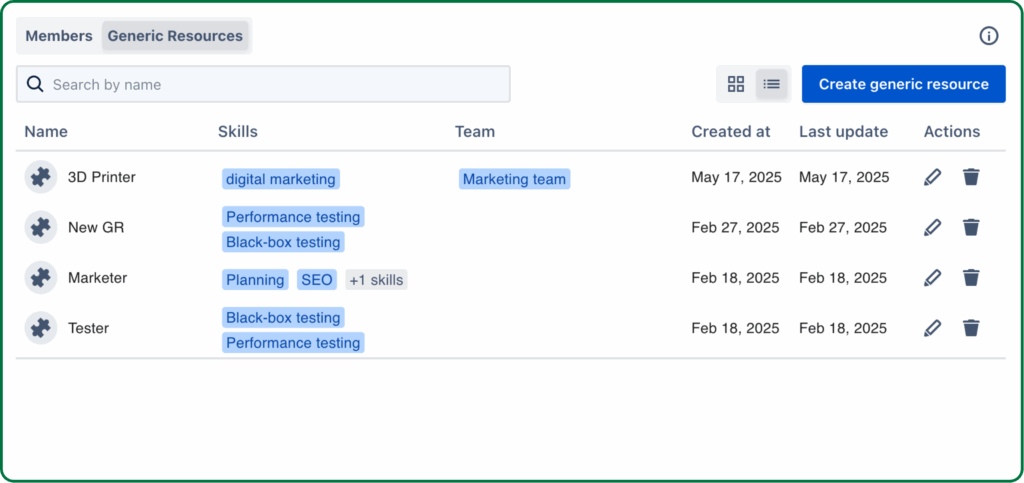
If you’re working on the Atlassian platform or Agile projects, you can use TeamBoard TimePlanner to streamline your IT capacity planning process. This tool allows you to set Generic resources to represent all your IT assets and allocate their capacity effectively.
5. Regularly update plans
Technology and business needs are constantly evolving. Regularly updating the capacity plan ensures that the organization is always ready to meet new demands.
Additionally, keeping plans flexible allows businesses to respond quickly to changes in the market or technological advancements.
6. Simulate load and stress tests
Testing the IT infrastructure under various conditions, such as high loads or during network outages, can help identify vulnerabilities. Simulating these stress scenarios ensures that the infrastructure can handle unexpected events without compromising performance.
7. Prioritize critical resources
We bet you’ve already heard this term multiple times, but let’s make it clear one more time: Prioritization is the key!
Not all IT systems are equally important. When planning, ensure that the most critical resources, such as those supporting core business functions, are given priority. This helps avoid downtime for essential services while optimizing less critical systems.
Conclusion
IT capacity planning is an essential process that ensures an organization’s IT infrastructure can effectively support both current and future demands. For project managers and team leaders, it is vital to be proactive and strategic in planning IT resources.
By understanding the process, leveraging best practices, and continuously monitoring system performance, businesses can ensure that they have the right resources in place to scale and adapt as needed. A well-structured capacity plan improves operational efficiency and protects the business from unnecessary risks, costs, and performance issues.