
Managing time well is one of the most important skills in project management. When time is handled poorly, even well-planned projects can quickly fall apart. Deadlines slip. Tasks pile up. Teams feel stressed. And stakeholders begin to lose confidence.
Good project time management helps prevent these issues. It brings clarity, structure, and predictability into the project. In this guide, we’ll walk through what project time management is, why it matters, the core processes, proven strategies, and the best tools to help you stay on schedule.
Whether you’re leading your first project or managing multiple teams, this article will help you stay organized and in control.
What Is Project Time Management?
Project time management is the practice of planning, organizing, and controlling how time is used throughout a project.
It involves breaking work into tasks, estimating how long each task will take, scheduling activities in the right order, and keeping track of progress along the way.
Think of it as the roadmap that keeps everyone moving together, at the right pace, toward a shared goal.
Good time management keeps a project predictable. It reduces surprises. It allows teams to focus on doing great work instead of scrambling at the last minute.
Why Is Project Time Management Important?
Before looking at the benefits, it helps to understand what happens when time management is missing.
Without proper time management:
- Tasks start late or run longer than expected.
- Teams feel overloaded because work piles up and deadlines clash.
- The project becomes reactive instead of planned.
- Priorities shift constantly, causing confusion.
- Budget overruns become more likely.
- Stakeholders lose trust because the project’s progress is uncertain.
Projects rarely fail due to lack of effort – but they often fail due to poor planning and unmanaged time.
When time is managed well, everything works smoothly. Here are the key reasons why time management is essential:
- Keeps the project on schedule
- Improves workflow clarity
- Reduces stress and uncertainty
- Prevents resource overload
- Supports better decision-making
- Boosts team productivity
- Helps meet stakeholder expectations
Short, simple, and clear – these reasons remind us why time deserves careful attention.
→ Related article: 2025 Project Management Trends: Essential Tools and Breakthrough Innovations
Benefits of Project Time Management
When you manage time well in a project, you don’t just “hit deadlines.”
You create a calmer, clearer, and more predictable working environment for everyone involved.
Here are some key benefits in more detail.
Clear direction for the team
A well-managed schedule tells people what needs to be done now, what’s coming next, and what truly matters. Instead of reacting to last-minute requests, the team can see the plan and work with confidence.
This sense of direction reduces confusion and cuts down on constant “What should I do next?” questions.
Realistic workloads and less burnout
With proper time management, you can see how much work each person has on their plate. Balanced workloads mean fewer late nights, less stress, and a more sustainable pace for the entire project.
Fewer surprises and delays
A clear schedule makes it easier to spot risks and bottlenecks early. If a task is slipping or taking longer than expected, you can see it on the timeline and react before it becomes a crisis.
This doesn’t mean problems never happen – but it does mean they’re less likely to derail the whole project.
Better use of resources and budget
When you know how long tasks take and when they happen, you can plan resources more efficiently. You can align people, tools, and budgets to the right activities at the right time.
Stronger stakeholder trust
Stakeholders feel more confident when you can show a clear, realistic schedule and report progress against it. On-time delivery builds trust. Even when changes happen, having a managed timeline makes it easier to explain the impact and reset expectations.
In short, good project time management doesn’t just help the schedule – it improves team health, decision-making, and the overall success of the project.
Project Time Management Processes: 7 Steps
These seven steps form the foundation of project time management. Each step plays a specific role in making sure the project stays on track.
Below, each step is explained in more detail, with practical advice on how to perform it effectively.
Step 1. Plan Schedule Management
This step defines how the schedule will be created, updated, and controlled. Think of it as setting the rules for your project timeline.
It includes decisions such as:
- Which scheduling tools you will use
- How progress will be tracked
- Who approves schedule changes
- How often updates are made
A good schedule management plan helps avoid confusion later. It ensures everyone knows how the timeline will be handled from day one.
Step 2. Define Activities
Here, you break the project into smaller, manageable tasks. This step makes the project clearer and easier to plan.
To perform this step:
- Review project requirements
- Identify all deliverables
- Break deliverables into tasks
- Avoid making tasks too large or too vague
A well-defined activity list becomes the foundation for accurate estimates and a realistic schedule.
Step 3. Sequence Activities
Once tasks are defined, you need to arrange them in the order they must be completed. Use tools like Gantt charts or flowcharts to visualize the sequence.
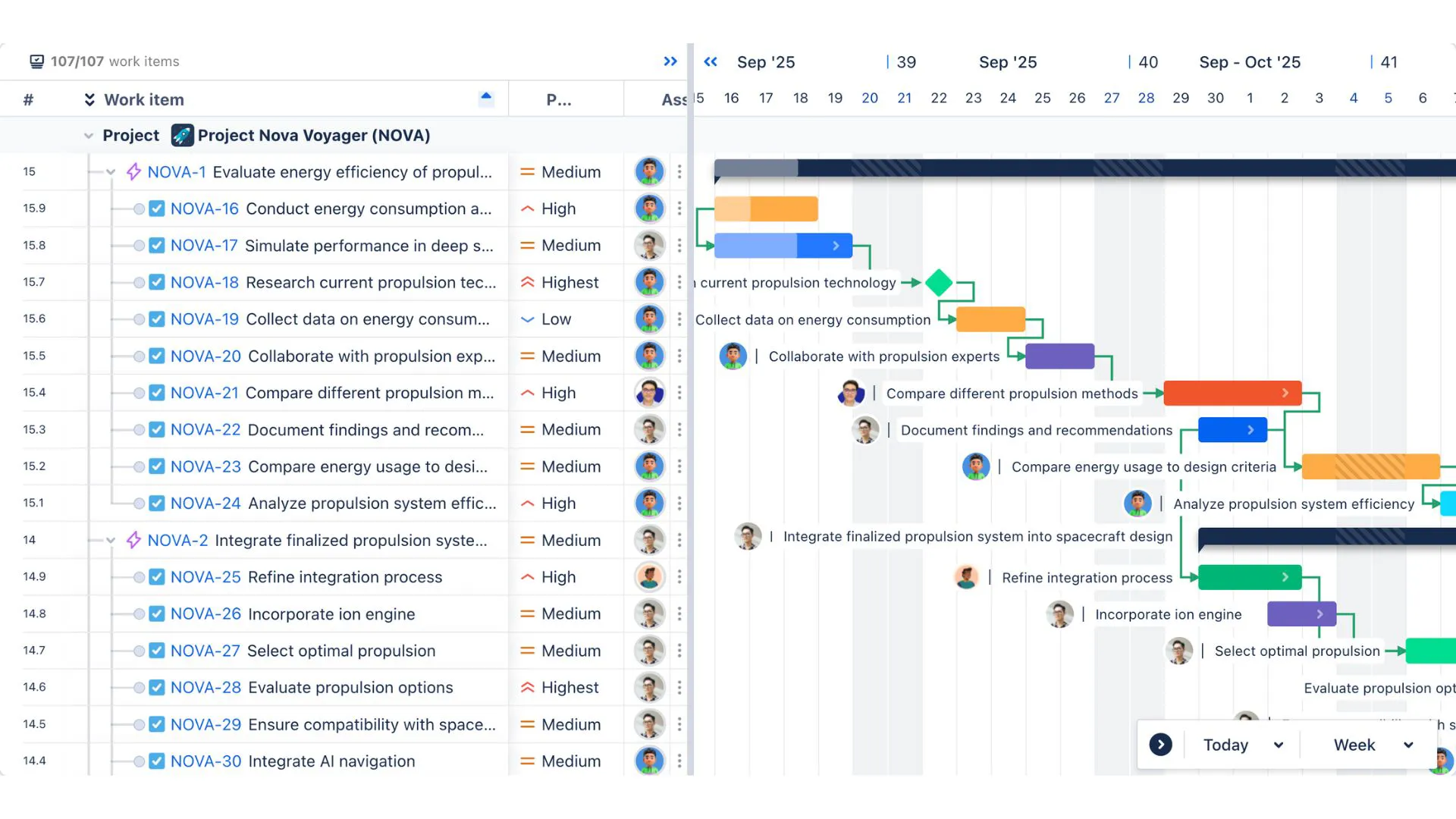
When handled properly, sequencing reduces delays by ensuring tasks start at the right time.
Step 4. Estimate Resources
Every task requires resources – people, tools, equipment, or materials. To estimate resources effectively:
- Identify the skills needed
- Determine the quantity of resources
- Check availability
- Consider resource constraints
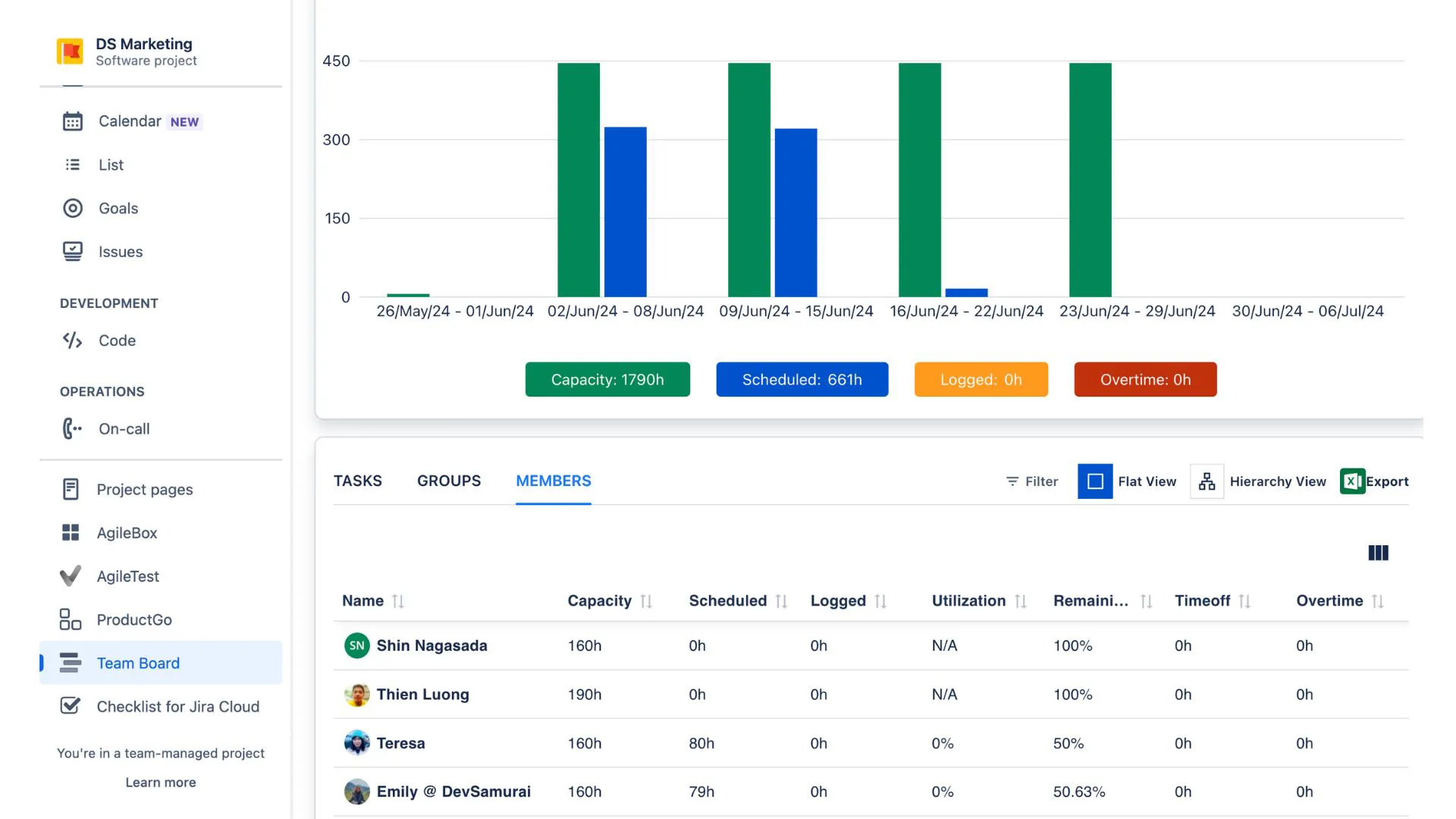
Good resource estimation keeps workloads balanced and prevents overbooking team members.
Step 5. Estimate Durations
Now you estimate how long each task will take. You can use:
- Historical data
- Expert judgment
- Team input
- Past project comparisons
Avoid overly optimistic estimates. It’s better to be realistic and add a small buffer if uncertainties exist.
Clear time estimates help build a schedule that feels achievable rather than stressful.
Step 6. Develop the Project Schedule
This is where everything comes together. You take all the tasks, durations, dependencies, and resources – and create a full project timeline.
During this step:
- Map tasks on a timeline
- Identify the critical path
- Adjust timing for resource availability
- Add milestones
- Confirm deadlines
The schedule becomes your main reference document throughout the project.
Step 7. Control the Schedule
Once the project begins, the schedule must be monitored and updated regularly.
This involves:
- Tracking actual vs. planned progress
- Identifying delays early
- Reallocating resources if needed
- Communicating schedule changes
Schedule control is ongoing. It keeps the project aligned with the plan even as challenges arise.
Project Time Management Strategies
Processes and frameworks are important, but your day-to-day habits and strategies are what actually keep a project on track.
Use the seven-step process as your backbone
The steps you use to plan, estimate, schedule, and control time should not be a one-off exercise. Treat them as your backbone: define activities, estimate durations, and build and maintain your schedule throughout the project.
Returning to this process regularly keeps the project grounded instead of drifting off-course.
Track how long tasks actually take
Time estimates are guesses until you compare them with reality. Make a habit of checking how long tasks really take versus what you planned.
You don’t need complex reports to start. Even simple check-ins like “We thought this would take two days; it took four” can teach you a lot. Over time, your estimates become more accurate, and your schedules become more realistic.
Help the team focus on one thing at a time
Multitasking looks productive, but often slows people down. Encourage team members to concentrate on one key task or a small group of related tasks instead of constantly switching.
This is especially important for high-focus work like design, development, analysis, or writing. Short, focused work blocks often produce better results than long, scattered days.
Avoid over-committing your team and your schedule
It’s easy to say “yes” to every request. But every “yes” takes time away from something else. Protect your team’s focus by being realistic about how much can be done in a given time frame.
Say clearly what fits into the current schedule and what needs to move to a later phase or sprint. This doesn’t just protect the timeline – it protects quality and team morale.
Use time blocking to create focus in the calendar
Time blocking means reserving specific chunks of time for specific types of work. For example, you might block mornings for deep work (planning, analysis, design) and afternoons for meetings and coordination.
This helps reduce interruptions and gives your team predictable “focus time.” Even simple blocks like “no meetings for two hours each day” can have a big impact on productivity.
Leverage tools that match your way of working
The best time management tools are the ones your team actually uses. Pick tools that make it easy to see the schedule, track progress, and adjust plans when things change.
A simple, shared visual timeline is often more powerful than a complex system that nobody updates. The goal is to support your work – not to add more work just to maintain the tool.
10 Best Project Time Management Tools
Tools don’t manage projects for you, but they do make time management much easier when chosen and used well.
Below are key tools and techniques that help you plan, track, and control time across your projects.
1. Work Breakdown Structure (WBS)
A Work Breakdown Structure breaks your project into smaller, manageable pieces. You start with the main deliverables, then break them down into sub-deliverables and tasks.
This tool is helpful because it forces you to think through everything that needs to be done. When the work is clearly broken down, it becomes easier to estimate time, assign responsibilities, and avoid forgetting important tasks.
2. Gantt Chart
A Gantt chart is a visual timeline of your project. Each task is represented by a bar that shows its start and end date, and you can see how tasks overlap and connect.
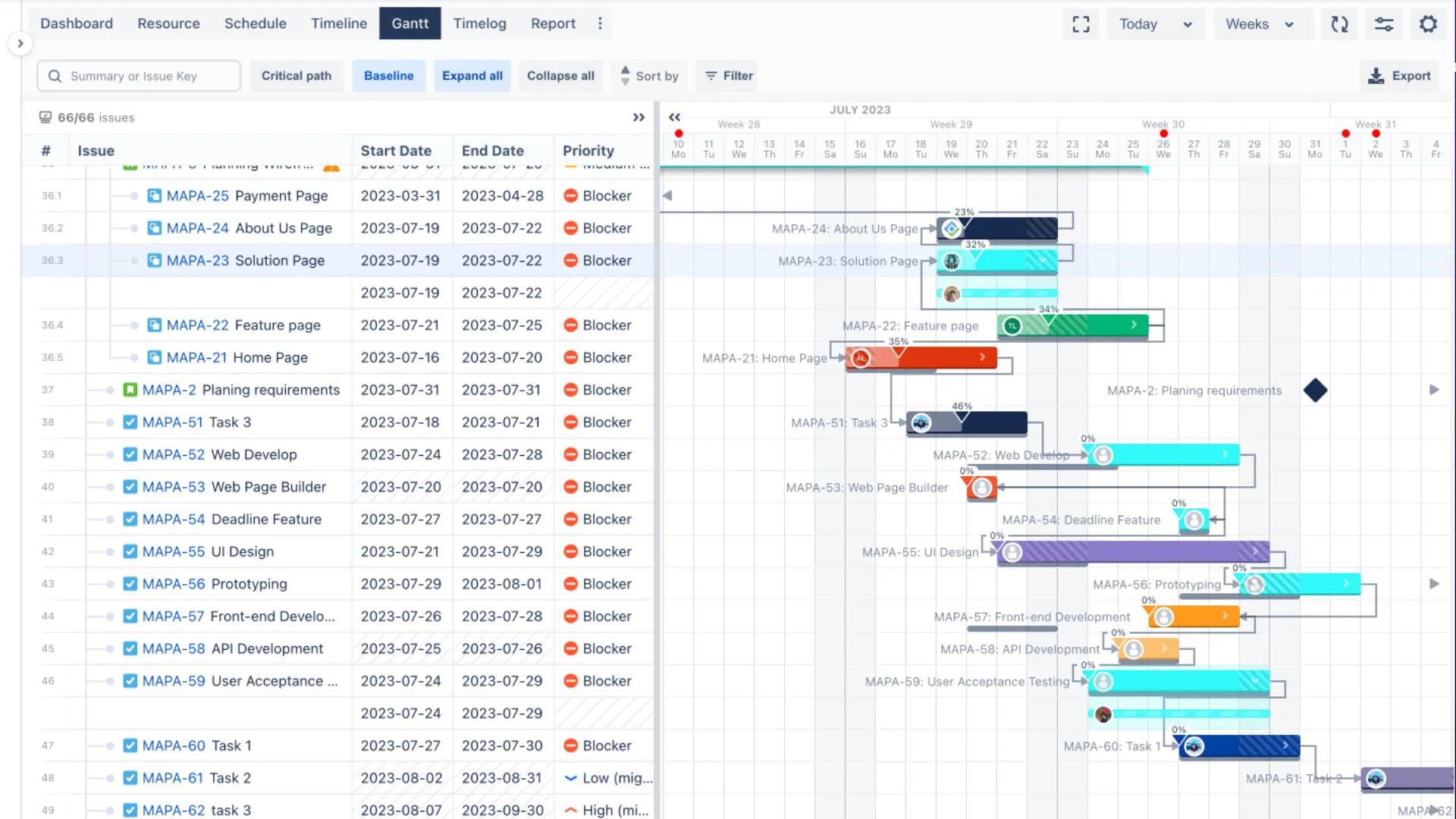
Gantt charts make it easier to understand the overall flow of the project at a glance. You can see what’s happening now, what comes next, and which tasks depend on others. This helps with planning, monitoring progress, and communicating the schedule with stakeholders.
3. Timesheets
Timesheets capture how much time people actually spend on tasks. They can be basic (manual logs) or part of a larger time tracking system.
These are especially useful when you need to compare planned vs. actual time, understand where effort is going, or bill clients based on time spent. Over time, timesheet data becomes a valuable source for improving estimates in future projects.
4. PERT Chart
A PERT (Program Evaluation and Review Technique) chart is used to analyze and estimate project durations when there is uncertainty. For each task, you consider three estimates: optimistic, pessimistic, and most likely.
This helps you understand the range of possible outcomes for the project timeline rather than relying on a single fixed date. PERT is particularly useful for complex projects where you don’t have much historical data to base your estimates on.
5. CPM Chart (Critical Path Method)
The Critical Path Method helps you identify the longest chain of dependent tasks in your project – this is the “critical path.” Any delay on this path directly delays the project finish date.
A CPM chart shows which tasks are critical and which have some flexibility. This is useful when you need to decide where to focus attention, add resources, or protect the schedule.
6. Flowchart
A flowchart maps out the steps in a process using boxes and arrows. It shows how work moves from one step to another, including decisions and possible paths.
While not a timeline by itself, a flowchart helps you understand the structure of the work. Once the process is clear, it becomes easier to turn it into a sequence of tasks and estimate time for each part.
7. Schedule Baseline
The schedule baseline is the approved version of your project schedule. It includes start and end dates, key milestones, and major dependencies.
You use the baseline as your reference point to measure actual performance. When dates shift, you can compare the new timeline against the baseline to understand the impact and explain it clearly to others.
8. Project Dashboards
Dashboards bring key information into one view – schedule status, upcoming deadlines, workload, risks, and progress. They are usually visual, with charts or summary indicators.
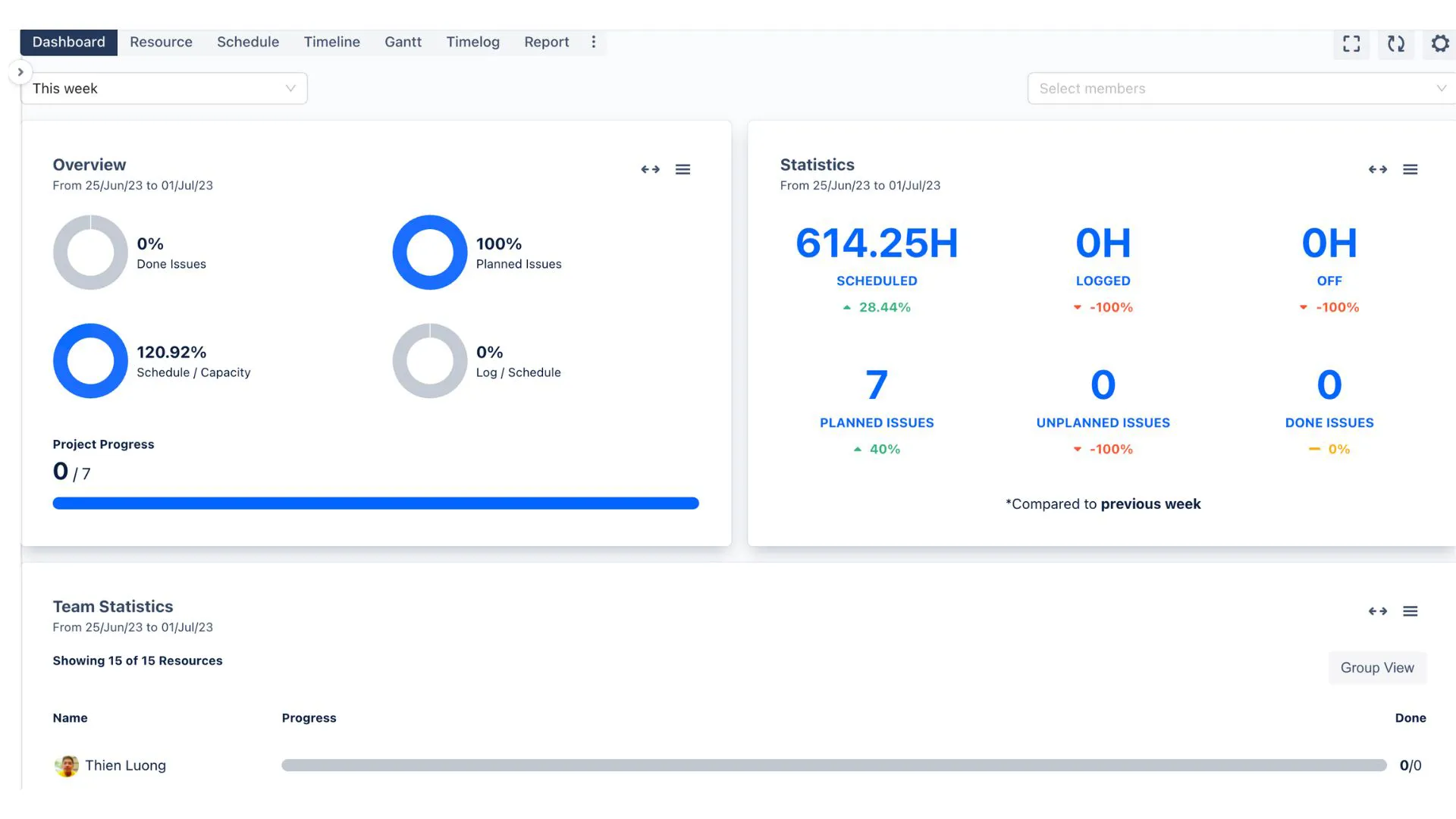
A good dashboard helps you quickly answer questions like “Are we on track?” or “Which area needs attention today?”. This is especially valuable for project managers who need to monitor several activities at once and share updates with stakeholders.
9. Eisenhower Matrix
The Eisenhower Matrix is a simple decision tool to prioritize tasks based on urgency and importance. Tasks are divided into four categories:
- Important and urgent
- Important but not urgent
- Not important but urgent
- Not important and not urgent
This helps you focus time on tasks that truly matter to the project’s success, instead of being driven only by what feels urgent in the moment.
10. Workload Management Chart
A workload management chart visualizes how much work each team member has assigned over time. You can see who is overloaded, who has capacity, and where task assignments may need to be adjusted.
This tool is essential for preventing burnout, balancing the team’s effort, and ensuring deadlines are realistic for the people doing the work.
Manage Your Time Effectively with ProScheduler
ProScheduler brings scheduling, resourcing, and workload visibility into a single tool directly integrated with Jira.
With ProScheduler, you can:
- Build project timelines using Gantt-style planning
- Create and adjust dependencies easily
- Balance team capacity with workload views
- Track progress in real time
- Stay aligned with your schedule baseline
It’s designed for teams that want a simple, visual way to manage time without leaving their Jira environment.
→ Try TeamBoard ProScheduler for free
If you want to improve project time management, reduce delays, and plan more confidently, ProScheduler is a powerful tool to support your workflow.
Conclusion
Project time management is one of the foundations of successful project delivery. When time is planned well, projects run smoother, teams stay focused, and deadlines stop feeling like pressure points.
By applying the right processes, using practical strategies, and choosing tools that support your workflow, you can manage time more confidently and effectively.
Start small. Build simple habits. Use tools that match your needs. And remember – project time management isn’t just about timelines. It’s about helping your team do their best work, without chaos or stress.