
It’s 4:30 PM on a Friday. Most of your team is already mentally checking out, maybe swapping weekend plans in Slack. But for you, as a manager, there is one final hurdle: the weekly progress report. You open Jira, hoping to see a clear picture of the week’s wins, only to find a landscape of “missing logs,” generic 8-hour blocks, and tickets that haven’t been touched since Tuesday.
Let’s be real here: Jira time logging is the chore nobody wants, but every project needs. It’s often the “Friday Afternoon Fiction”—a time when developers try to reconstruct their entire week from memory, resulting in data that is, at best, a polite guess.
And it’s not just a feeling. Studies by Accelo show that employees filling in timesheets at the end of the week are only 47% accurate, whereas it is 66% for those who track time daily. That means nearly half of your team is relying on memory instead of real data.
As managers, we don’t want to be “time cops.” We want to be leaders who make informed decisions. To get there, we have to stop treating time tracking as a compliance task and make it a seamless daily habit. Here’s how we move from the Friday scramble to a system that actually works—for everyone.
What is Jira time logging?
Before we dive into making time logging easier, let’s first break down what we’re actually talking about here.
Jira time logging is the practice of tracking the time spent on tasks or stories in Jira. For a manager, it’s the key to understanding how your team is spending its time—whether that’s on bugs, new features, or refactoring old code.
At first glance, this might seem like a minor task, but the impact is huge. Accurate time logging helps with things like:
- Project tracking: How much longer will this task take? Are we on track to meet deadlines?
- Resource management: Are certain team members overloaded, while others have capacity?
- Billing: For service-based businesses, it’s essential to track billable vs. non-billable hours.
- Reporting: Time logs help generate real-time reports that give you insight into your team’s productivity and where they’re getting stuck.
In short, it’s not just about knowing what’s been done; it’s about understanding how and why it’s been done.
But here’s the catch: time logging is only useful if it’s actually accurate.
Research has shown that people can be off by 20–30% when estimating time after the fact. So when logs are filled in at the end of the week, the data quickly becomes unreliable.
Who usually works with time logging
Time logging in Jira isn’t limited to just developers or project managers. Multiple roles benefit from accurate and consistent time tracking.
- Project managers: Use Jira time logging to understand progress, spot delays early, review workload distribution, and make better decisions about deadlines, priorities, and capacity.
- Developers and engineers: Log time spent on coding, bug fixes, code reviews, support tasks, and technical improvements so daily work is visible and easier to track.
- QA engineers and testers: Track time used for test execution, regression testing, bug validation, and retesting, which helps teams understand the real effort behind quality assurance.
- Consultants, agencies, and service teams: Depend on Jira time logging to record billable work accurately, support client reporting, and keep invoicing clear and reliable.
- Finance, operations, and leadership teams: May not log time directly every day, but they rely on time logging data, or time calculator data for budgeting, forecasting, utilization review, and performance reporting.
- Remote and distributed teams: Benefit from Jira time logging because it creates a shared record of work completed across time zones, helping managers maintain visibility without micromanaging.
Challenges when logging time in Jira daily
If time logging is so important, why is it such a struggle? In fact, it is not always as easy as it sounds. Here are some common challenges many teams face when logging time in Jira.
1. Manual entry
Time logging is easy… unless you forget to do it.
Time logging is easy to forget, especially when you’re deep in the code or running a meeting. But the reality is that if people aren’t diligent about logging their time every day, it throws off your whole system.
Manual time logging often turns into a Friday afternoon scramble to remember what was worked on throughout the week. This results in data that’s, at best, a rough estimate.
And let’s face it, nobody likes scrambling for those last-minute reports.
2. Inconsistent logging
Here’s the thing—when one developer logs their time every day, but another only does it at the end of the week, you’re not getting a complete picture. This inconsistency makes it difficult for project managers to trust the data and create accurate reports.
Some team members might log their hours by the minute, while others might log everything in one 8-hour block. It’s chaos.
3. Tracking multiple tasks
We all know that Jira users often juggle multiple tasks in a single day. Time tracking across multiple Jira work items, whether it’s a bug fix, a feature, or a hotfix, can become a nightmare.
Without a system to track everything efficiently, you’ll find time logs filled with general entries that don’t tell the full story.
4. Difficulty in tracking billable hours
For those working with clients or in service industries, tracking billable vs. non-billable hours is a tricky business. Manually identifying which tasks are billable and which aren’t adds another layer of complexity.
And let’s not forget the potential for human error.
5. Manual reports
Let’s not forget that generating reports on time logs can be a manual and error-prone process without automated tools. Project managers need to aggregate data from multiple sources, which takes time and often leads to mistakes.
About 38% of employees say time tracking is their least favorite task. So if your system depends on discipline alone, it’s already working against you.
How to make daily Jira time logging simple with TimePlanner
The secret to better data isn’t more discipline; it’s better tools. We need to lower the “energy cost” of logging time and find a clearer way to record work while it is still fresh.
That is where TimePlanner helps. Instead of treating time logging as an end-of-day admin task, it supports a more natural flow: do the work, track the time, log it accurately, and move on.
Here is how TimePlanner helps teams build a better daily logging habit.
1. Track time while work is happening
As mentioned earlier, one of the biggest reasons time logs become inaccurate is timing. When people wait until Friday afternoon to fill in their week, they usually rely on memory. That is when vague entries and estimated hour blocks start to appear.
By using TimePlanner’s Schedules, you can solve this problem and make time tracking part of the workday itself. Team members can plan tasks directly in the board and set the time needed as they move through Jira work items. As a result, it is easier to capture actual effort rather than reconstruct it later.
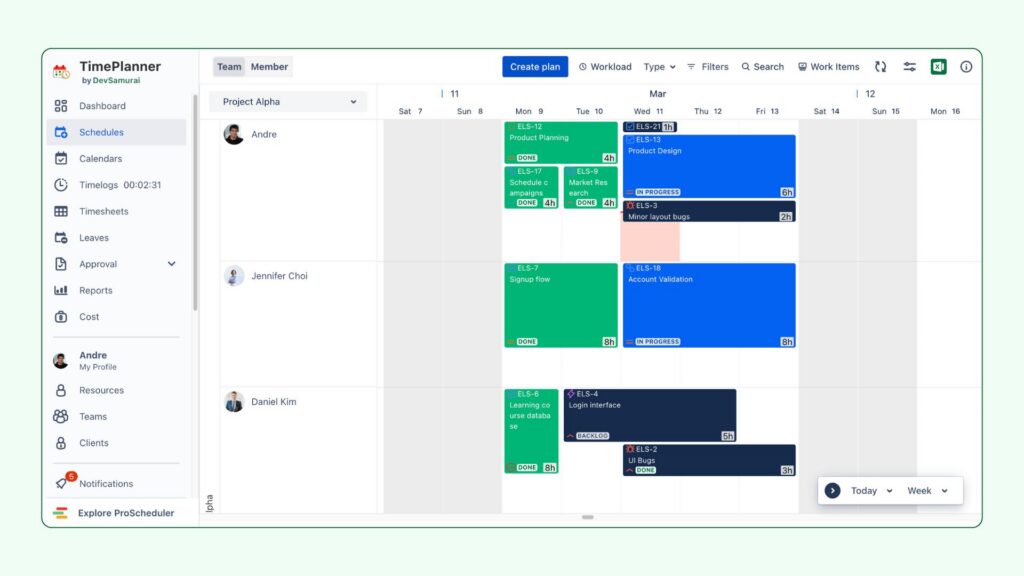
For managers, this means Jira data becomes more reliable because it reflects how work actually happened, not how someone vaguely remembers it.
2. Use a stopwatch timer for real-time logging
A stopwatch feature is especially helpful for teams that want a practical way to log time accurately without extra effort. Instead of manually logging hours after finishing a task, users can use TimePlanner’s timer to start recording when they begin a new task and stop it when they are done.
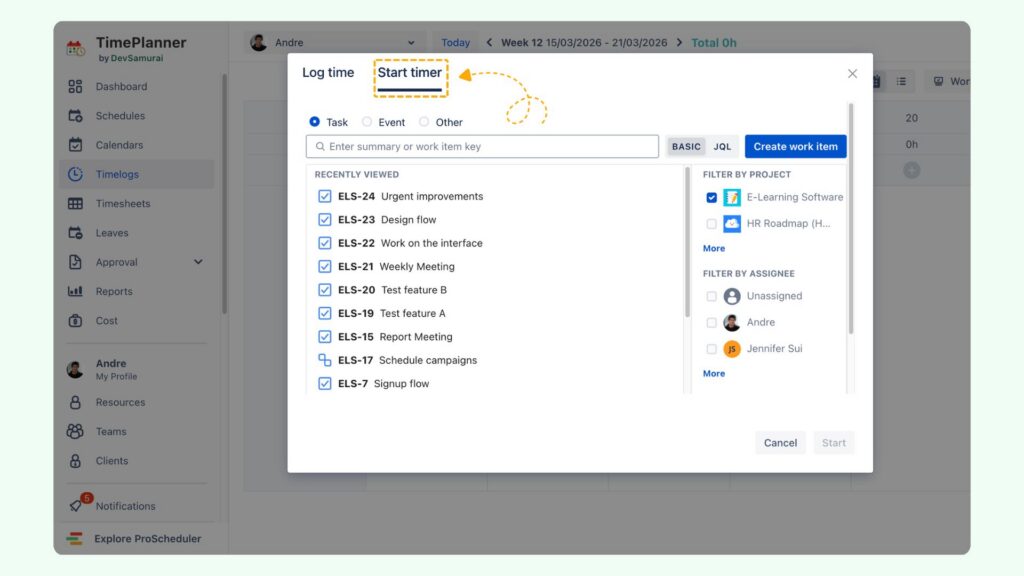
When starting a new task, navigate to the Start Timer section within the work item. Then, you simply click start to begin logging your time in real-time.
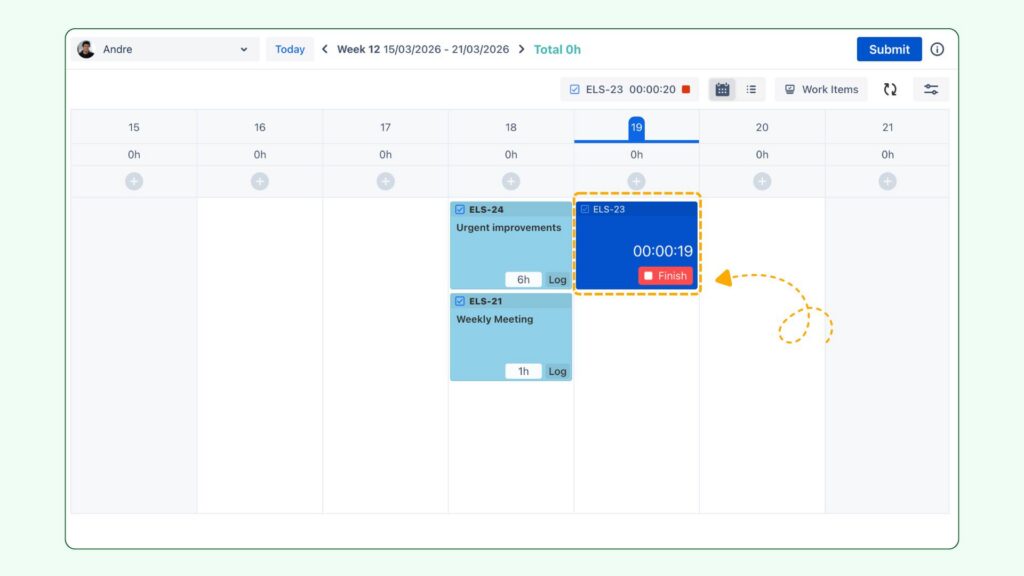
Here is a trick: you can also use this stopwatch timer after planning tasks in Schedules. You can start the timer for a planned task if you want to log a more accurate time for it. Then, stop the timer when you finish the task.
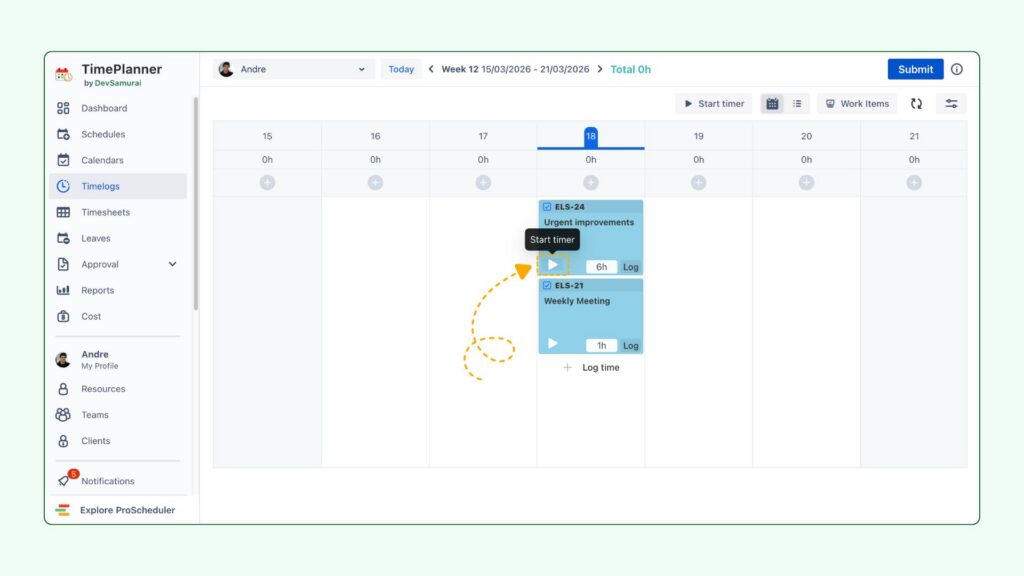
This concept sounds simple, but it makes a major difference in daily Jira time logging. It supports:
- Real-time accuracy, because time is recorded as work happens
- Less guesswork, especially for tasks that are shorter or interrupted
- Better visibility into context switching, when team members move between several tasks in one day
- Easier habit-building, because starting and stopping a timer is quicker than writing logs from memory later
And for managers, stopwatch-based tracking also gives a more realistic view of effort. You can see where time is actually going instead of relying on rough estimates that were entered after the fact.
Just remember to clock in and clock out for each task so you don’t have to explain to HR why you’re late to work or having OTs.
3. Make daily time logging easier for multitasking teams
In most teams, people aren’t continuously working on one single task from start to finish without any interruption. They move between project work, bug fixes, internal discussions, support requests, and unplanned tasks.
That is exactly why Jira time logging often breaks down. The more fragmented the day is, the harder it becomes to log time accurately afterward.
With TimePlanner, you can track time across different tasks throughout the day. Whether someone is handling planned sprint work or jumping into urgent fixes, they can capture time more easily as they go. This creates a more complete and honest record of the workday.
Why does that matter? Because, from a management perspective, hidden work is one of the biggest reasons planning goes wrong. If time is only logged against major tickets, you miss the support work, interruptions, and small tasks that consume real team capacity.
4. Support billable hours without creating extra admin work
For agencies, consultancies, and service teams, time logging is not only about internal visibility. It is also tied to billing. That raises the stakes. If billable hours are not tracked clearly, teams risk underbilling, overbilling, or creating friction with clients.
Fortunately, TimePlanner helps simplify this by combining billable hours tracking with accurate Jira timelog practices. When planning tasks in Schedules, you and your team can easily mark work as billable or non-billable by toggling the Mark as billable option and selecting a predefined billable rate.
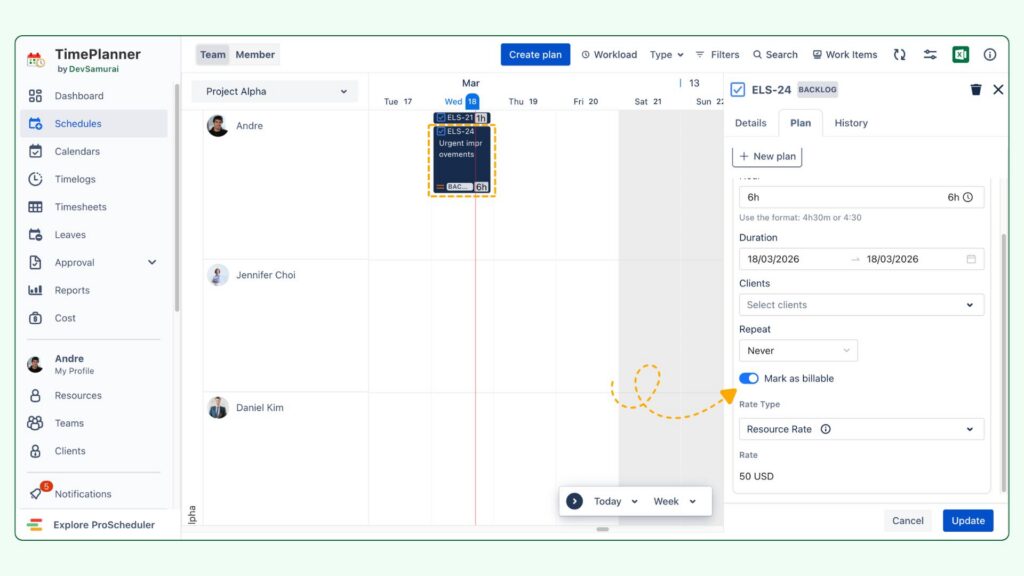
Instead of treating billing as a separate process, teams can connect logged time directly to the work being done. This makes it easier to:
- Identify which hours are billable and which are not
- Keep client work clearly separated from internal work
- Prepare more reliable billing records
- Reduce disputes caused by vague or incomplete time entries
Besides, managers can check on the Cost section to view a detailed report, comparing the actual and scheduled costs of all members in each task.
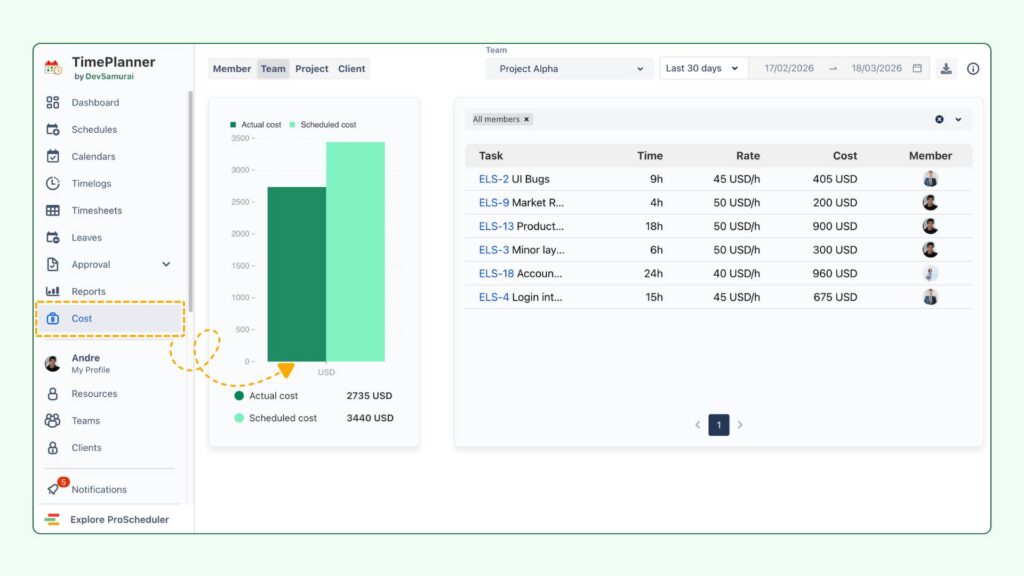
You are not just asking the team to log time for reporting. You are helping build a record that can support invoicing, utilization analysis, and account health.
Final thoughts
At the end of the day, Jira time logging doesn’t have to be the pain point everyone dreads. With TimePlanner, you can transform time tracking into a seamless, automated process that actually helps your team stay organized and efficient. Say goodbye to the Friday scramble and hello to accurate, reliable time logs.
Time tracking is no longer a chore—it’s just another part of your team’s daily rhythm. And as a manager, that’s something you can really get behind.
See other use cases: