
Choosing the right Gantt Chart or Roadmapping tool can be the difference between a confusing project timeline and a clear, well-organized plan. As teams scale and work grows more complex, Jira users increasingly turn to timeline-based planning tools to gain clarity across projects, resources, and long-term strategy.
In this 2025 roundup, we highlight the top Gantt and roadmapping apps for Jira, comparing their features, strengths, limitations, and ideal use cases so you can choose the tool that elevates your planning game.
How to Choose the Best Gantt & Roadmapping Tool for Jira
Choosing the best tool depends on your team size, project type, and how you use Jira. While most apps offer timelines and scheduling features, key differences lie in how deeply they integrate with Jira and how well they support your day-to-day workflow.
1. Integration Depth with Jira
Look for tools that support:
-
Real-time syncing between Jira issues and the timeline
-
Jira fields such as assignee, sprint, versions, estimates, story points, and dependencies
-
Support for epics, subtasks, and custom issue types
-
Compatibility with Jira Cloud, Data Center, or both
2. Advanced Scheduling Features
A strong Gantt tool should include:
-
Multiple dependency types (FS, SS, FF, SF)
-
Critical Path analysis
-
Auto-scheduling
-
Baselines
-
Milestones
-
Recurring tasks
3. Roadmapping Capabilities
Roadmap features to look for:
-
High-level timelines for initiatives, epics, and releases
-
Portfolio or multi-project view
-
Status tracking
-
Quarterly/yearly planning
-
Grouping by team or department
4. Collaboration & Communication Features
A good tool should offer:
-
Exporting/sharing to PDF, PNG, ICS
-
Real-time updates
-
Notes/comments in the timeline
-
Permissions to control editing/viewing
5. Performance & Scalability
For larger organizations:
-
Smooth performance with large datasets
-
Good filtering and grouping
-
Multi-team support
-
Clear structure for complex projects
6. Pricing & Value for Money
Compare:
-
Cost per user
-
Add-on requirements
-
Cloud vs. Data Center pricing
-
How costs scale as your team grows
Top 5 Best Gantt Chart & Roadmapping Plugins for Jira in 2025
1. TeamBoard ProScheduler
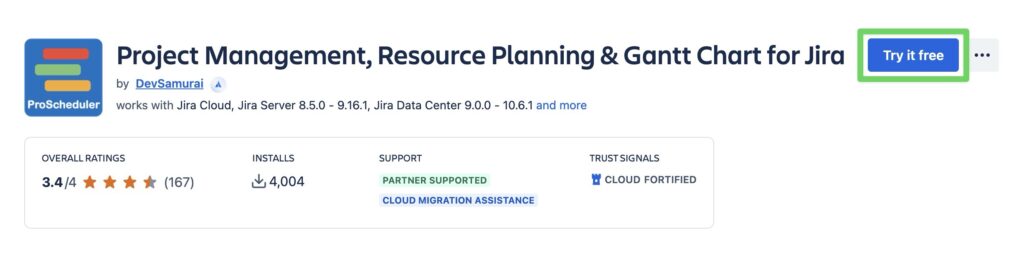
TeamBoard ProScheduler is a project planning and resource management app designed specifically for Jira. Unlike tools that focus only on Gantt charts or only on roadmaps, ProScheduler combines Gantt charts, roadmaps, resource planning, team boards, and heatmaps into one unified view.
Advantages
- Work Breakdown Structure (WBS) for Clear Project Hierarchy
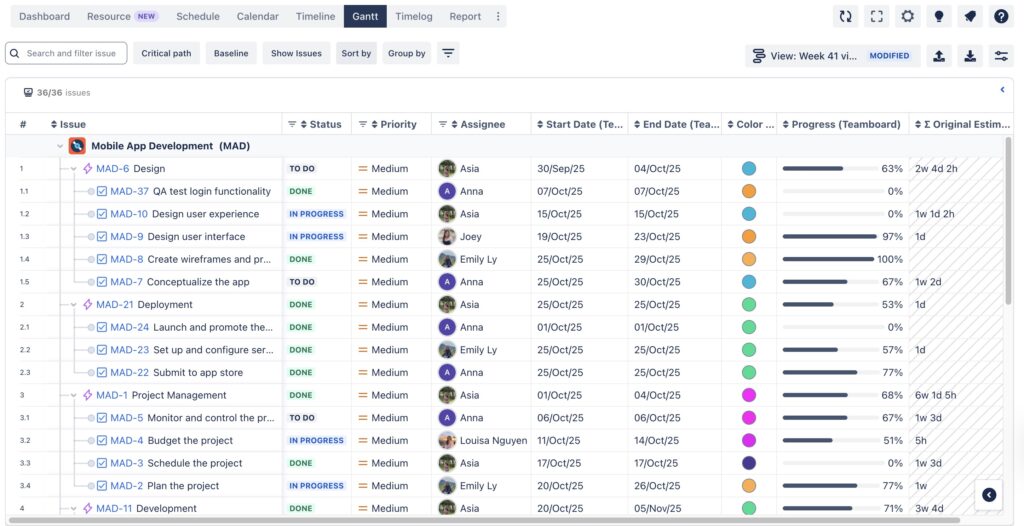
Jira Timeline only supports a flat or limited hierarchy, making it difficult to understand how epics, tasks, and subtasks connect. ProScheduler provides a full multi-level WBS directly in the Gantt chart, allowing PMs to expand/collapse epics, stories, tasks, and subtasks. This improves clarity, reveals missing work, and keeps structure clear as the project grows.
- Auto-Scheduling That Keeps Timelines Accurate
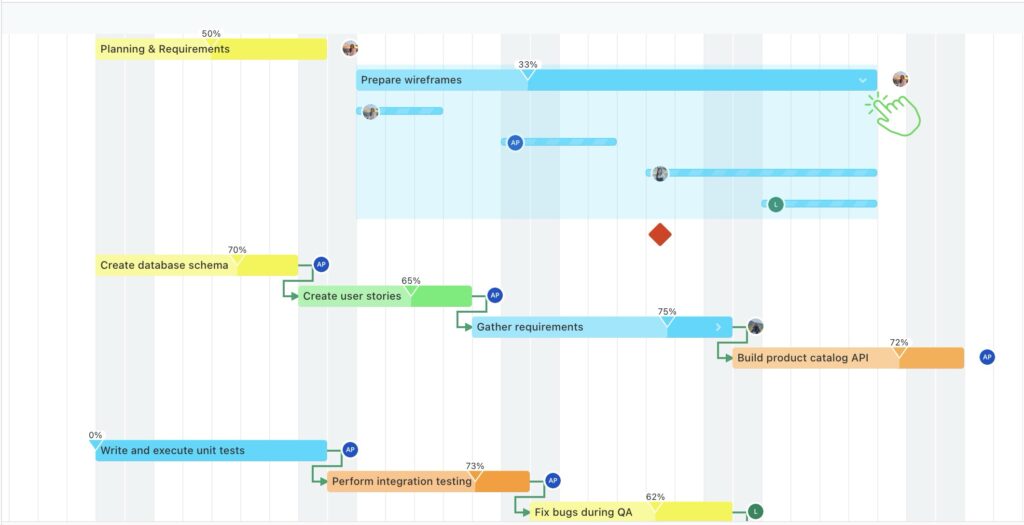
ProScheduler’s auto-scheduling engine automatically updates parent/child items and linked tasks, keeping the schedule consistent and preventing timeline errors—especially in large or dependency-heavy roadmaps.
- Multi-Assignee Support for Shared Work
ProScheduler supports multiple assignees per task, each with planned hours, making it ideal for collaborative or cross-functional work.
- Built-In Excel / PDF Export
Unlike BigGantt or Structure (which require add-ons), ProScheduler includes Excel and PDF export built in. PMs can easily share timelines and reports with stakeholders outside Jira.
- Multiple Timeline Views (Daily → Yearly)
ProScheduler includes daily, weekly, monthly, quarterly, and yearly views, allowing teams to move from sprint-level planning to long-term roadmapping with ease.
- Advanced Gantt Features
ProScheduler includes all advanced Gantt features missing from Jira Timeline:
Dependency management (FS, SS, FF, SF)
These tools help PMs track schedule variance, identify risks, and manage complex projects confidently.
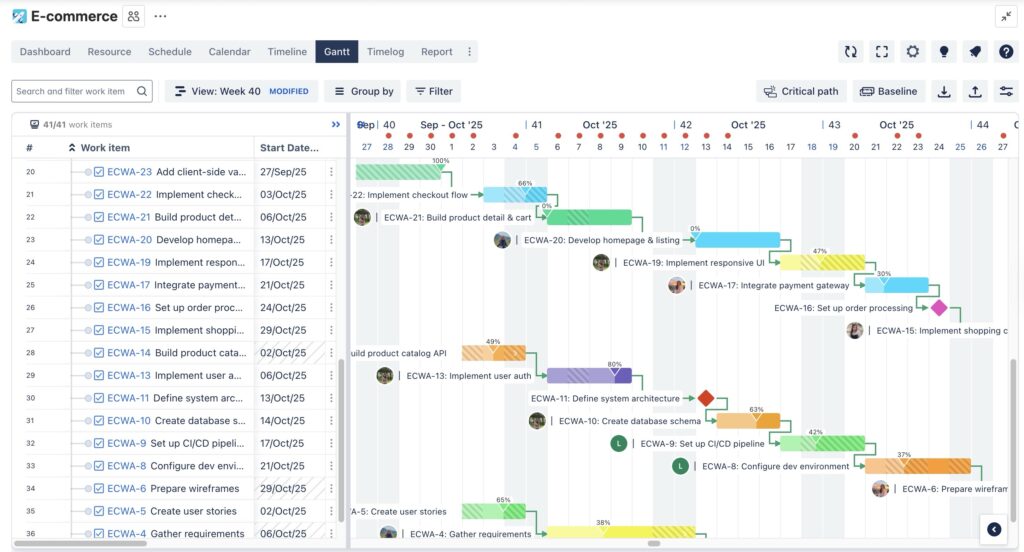
- Multiple View Modes for Teams, Projects, and Portfolios
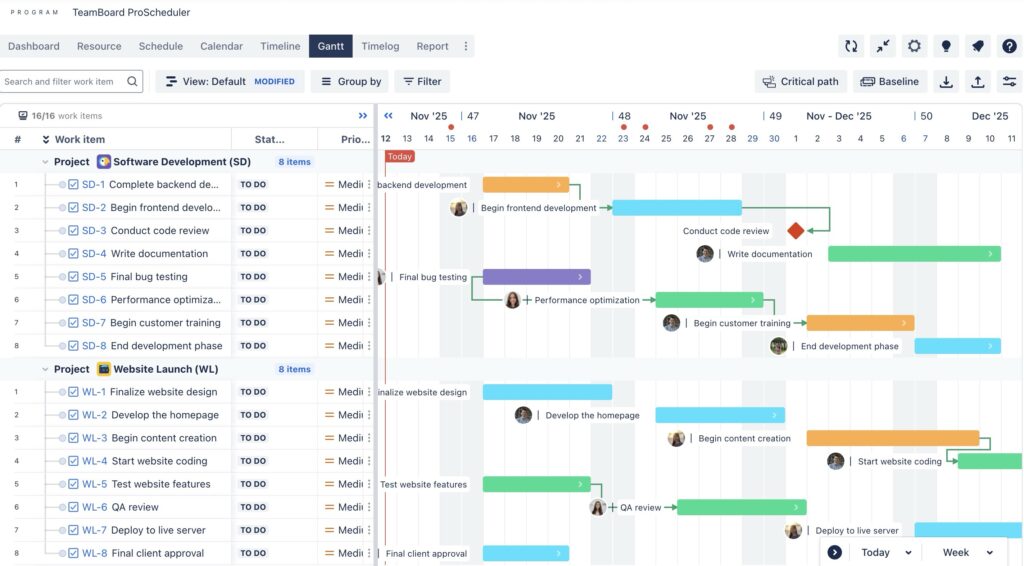
ProScheduler offers team, project, and portfolio views, making it easy to switch between detailed scheduling and high-level oversight. This flexibility allows both team leads and PMOs to plan, track, and manage work from a single, unified hub.
Disadvantages
- Fewer Enterprise PPM Features than Structure
ProScheduler is strong in scheduling and resources but lacks the deep portfolio modeling, custom formulas, and enterprise reporting provided by Structure + Structure.Gantt.
- No Public REST API
Limits automation and custom integration options for organizations that rely heavily on API-driven workflows.
Pricing Plans
- Free up to 10 users
- 100 – 150 USD/ Month (1,5/user)
- 1000 – 675 USD/ Month (0,68/user)
Integrations
- Jira Software: full issue syncing for dates, dependencies, and status.
- Jira Work Management: supports non-technical teams and business departments.
- ICS calendar export: syncs schedules to Outlook, Google Calendar, and more.
- TimePlanner: adds time tracking, timesheets, and approval workflows.
Best For
Teams needing Gantt + roadmap + resource planning in one tool, without the cost or complexity of enterprise PPM systems. Ideal for cross-functional teams managing multiple projects and needing clear schedules, capacity insights, and easy roadmap planning.
2. BigGantt
BigGantt is one of the most established Gantt chart tools on the Atlassian Marketplace. It focuses heavily on advanced scheduling logic, dependencies, and timeline visibility. While it doesn’t include built-in resource management (that requires BigPicture), it remains a popular choice for teams that need powerful Gantt chart features inside Jira.
Advantages
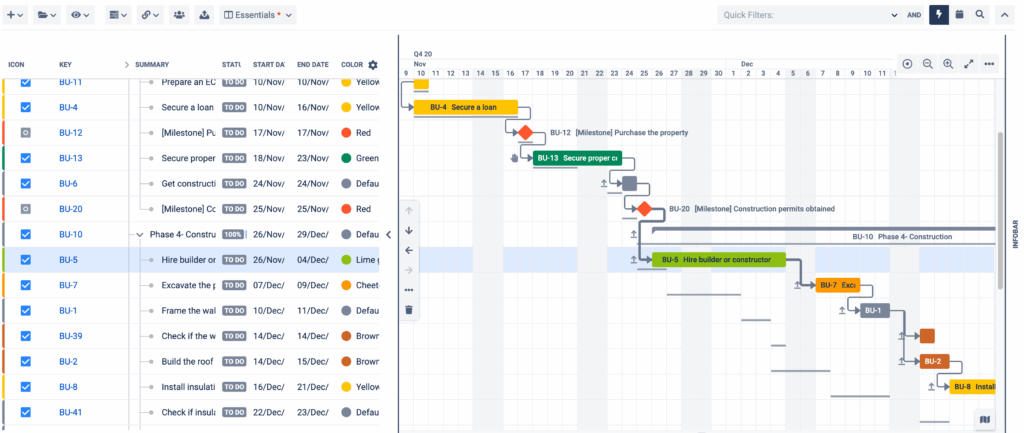
- Advanced Dependency Management
Supports all dependency types (FS, SS, FF, SF). This is essential for teams running large, dependency-heavy projects, especially in waterfall or hybrid models.
- Powerful Auto-Scheduling Engine
BigGantt offers multiple scheduling modes, giving PMs more control over how timelines adjust when dependencies shift—one of the strongest auto-scheduling systems in Jira apps.
- Strong Hierarchy Support
Compared to Jira Timeline’s limited structure, BigGantt allows users to create more flexible multi-level hierarchies. PMs can manage epics, tasks, subtasks, and custom structures more effectively and use filters to tailor views for different audiences.
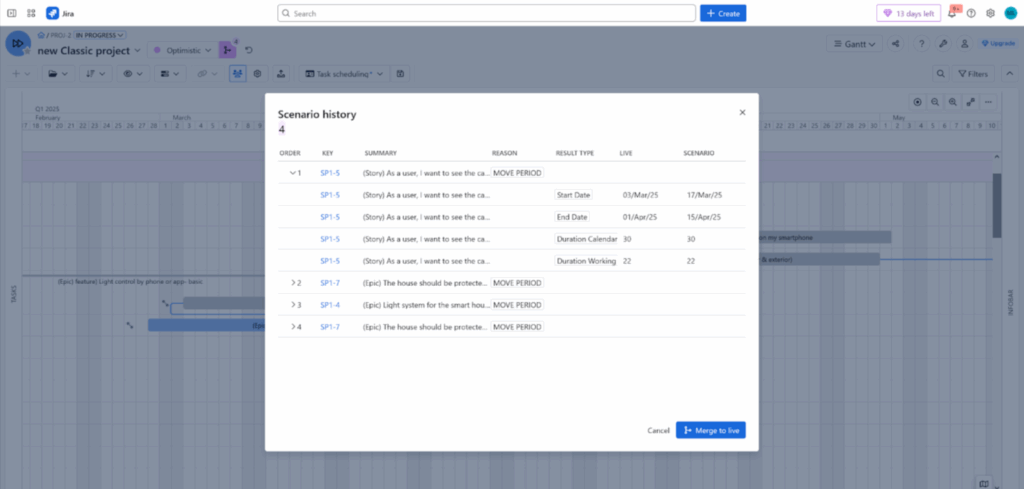
- Scenario Mode for Risk-Free Planning
BigGantt includes “What-If” Scenario planning, allowing PMs to simulate schedule changes without affecting real Jira data. This is especially useful when modeling delays or resource changes before making decisions.
Disadvantages
-
No built-in resource management: requires upgrading to BigPicture for full resource planning.
-
Heavier UI: can feel slower or more complex than lightweight tools like ProScheduler.
-
Import/export limitations: requires companion apps for MS Project or Excel exports.
Pricing Plans
- Free up to 10 users
- 100 – 182 USD/ Month (1,85/user)
- 1000 – 692 USD/ Month (0,69/user
Integrations
-
Jira Software
-
BigPicture ecosystem
-
Native Jira dependencies and fields
Best For
Teams running complex, dependency-driven projects needing advanced scheduling, strong auto-scheduling, and scenario modeling.
3. Structure + Structure.Gantt
Structure is an enterprise-grade hierarchy and reporting tool, and Structure.Gantt adds a full Gantt chart on top of it. Together, they form one of the most powerful PPM (Project Portfolio Management) solutions on Jira, especially for organizations with complex multi-project structures.
Advantages
- Industry-Leading Multi-Level Hierarchy (Better Than Any Other Tool)
Structure is known for its unlimited custom hierarchy capabilities—not possible in Jira Timeline or most standalone Gantt tools. PMOs can build portfolio → program → project → epic → task structures that match their organization perfectly.
- Formula Columns for Custom Calculations
A unique advantage: Structure allows advanced formulas similar to spreadsheets. PMOs can calculate risk scores, financial rollups, weighted priorities, or custom KPIs—far beyond what Jira offers natively.
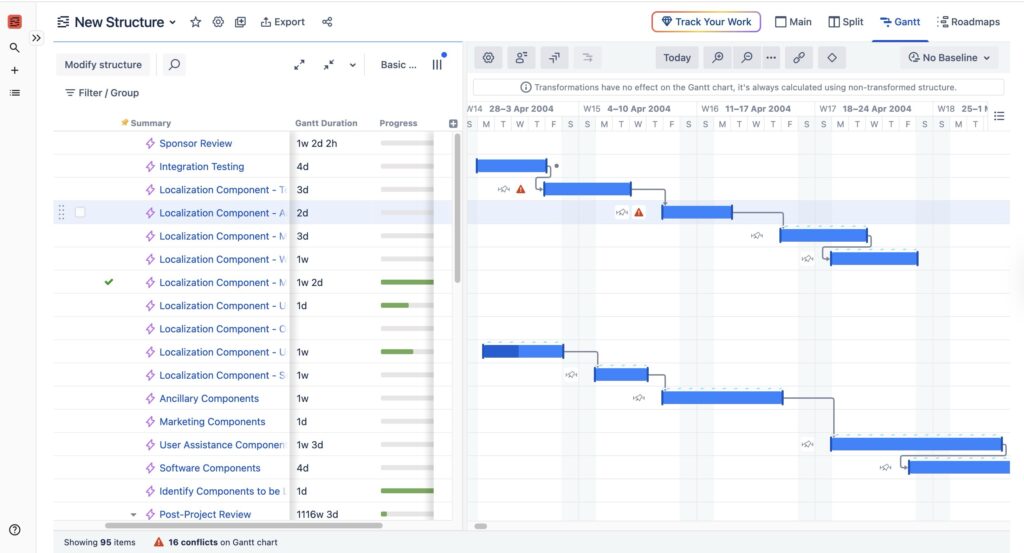
- Robust Scheduling Warnings and Data Quality Checks
Structure.Gantt includes strong visual alerts for broken dependencies, misaligned dates, or hierarchy inconsistencies. This helps PMs quickly spot risks and ensure data accuracy across large project portfolios.
- Enterprise-Grade Reporting and Rollups
Structure aggregates estimates, time spent, story points, and progress across all hierarchy levels. This gives executives a clear top-down view not available in Jira or lighter tools.
Disadvantages
-
Price: requires paying for two apps (Structure + Structure.Gantt).
-
Steep learning curve: powerful, but not beginner-friendly.
-
No built-in resource management: only basic views unless integrated with additional tools.
Pricing Plans
- Not free. Requires Structure and Structure Gantt
- 100 – 473 USD / Month (4.73/user)
- 1000 – 3005 USD / Month (3/user)
Integrations
-
Jira Software
-
Tempo, BigPicture, and BI tools
-
Custom automation via API
Best For
PMOs and enterprises needing deep custom hierarchies, complex rollups, and multi-project governance rather than simple scheduling.
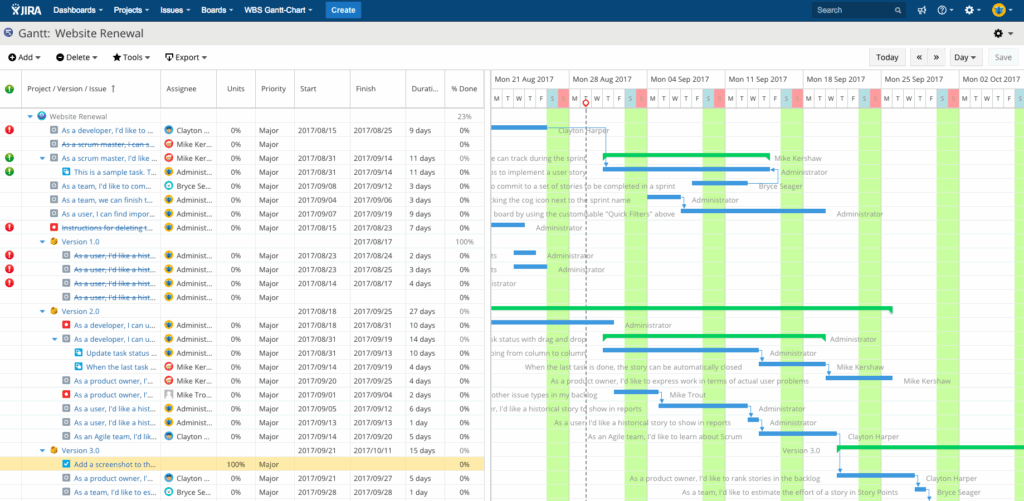
4. WBS Gantt-Chart for Jira
WBS Gantt-Chart for Jira brings a traditional, Microsoft Project–style planning experience into Jira. It focuses on structured Work Breakdown Structures (WBS), classic Gantt chart scheduling, and strong compatibility with MS Project files. Its straightforward hierarchy and familiar interface make it a popular choice for teams transitioning from traditional project management tools.
WBS Gantt-Chart doesn’t include advanced resource or portfolio management, but it delivers reliable Gantt and WBS capabilities at an affordable price—especially for large user bases.
Advantages
- Traditional WBS + Gantt Experience (Familiar for MS Project Users)
WBS Gantt-Chart offers a clean, structured hierarchy resembling Microsoft Project, allowing PMs to break down work into meaningful stages. For organizations moving from Excel or MS Project, this provides an immediate sense of familiarity, reducing training time and adoption friction.
-
Baseline & Critical Path Support
The tool includes strong baseline functionality and clear critical path visualization. This helps PMs compare planned vs. actual progress and identify tasks that directly impact overall project duration.
- MS Project Import/Export
A major advantage: WBS Gantt is one of the best tools for direct MS Project file import/export. This is valuable for organizations with external stakeholders or legacy projects.
- Cost-Effective at Scale
WBS Gantt-Chart is known for having one of the lowest costs per user at higher user tiers (100–1000 seats). This makes it attractive for enterprises that need large-scale deployment without the high price of Structure or BigGantt.
Disadvantages
- Outdated UI Compared to Modern Tools
While functional, the interface feels older and less polished than BigGantt or ProScheduler, which may impact user experience, especially for teams expecting modern UI patterns.
- Limited Resource Management
WBS Gantt-Chart offers only basic resource monitoring. Teams needing resource management will require another app. It does not support: Capacity planning, Heatmaps, Generic resources, Multi-assignee planning
- Rigid Hierarchy
The hierarchy works well for classic WBS but lacks the flexibility of Structure or the WBS customization seen in tools like ProScheduler.
Pricing Plans
- Free up to 10 users
- 100 – 125 USD/ Month (1,25/user)
- 1000 – 590 USD/ Month (0,59/user)
Integrations
-
Microsoft Project (.mpp import/export)
-
Jira Software (native issue syncing)
-
Works with standard Jira fields (dates, assignees, estimates)
Best For
Teams looking for a classic WBS + Gantt solution, especially those transitioning from MS Project or needing simple, reliable scheduling without advanced portfolio or resource management. Ideal for traditional project managers and organizations with predictable, structured planning workflows.
5. Jira Plans & Jira Timeline
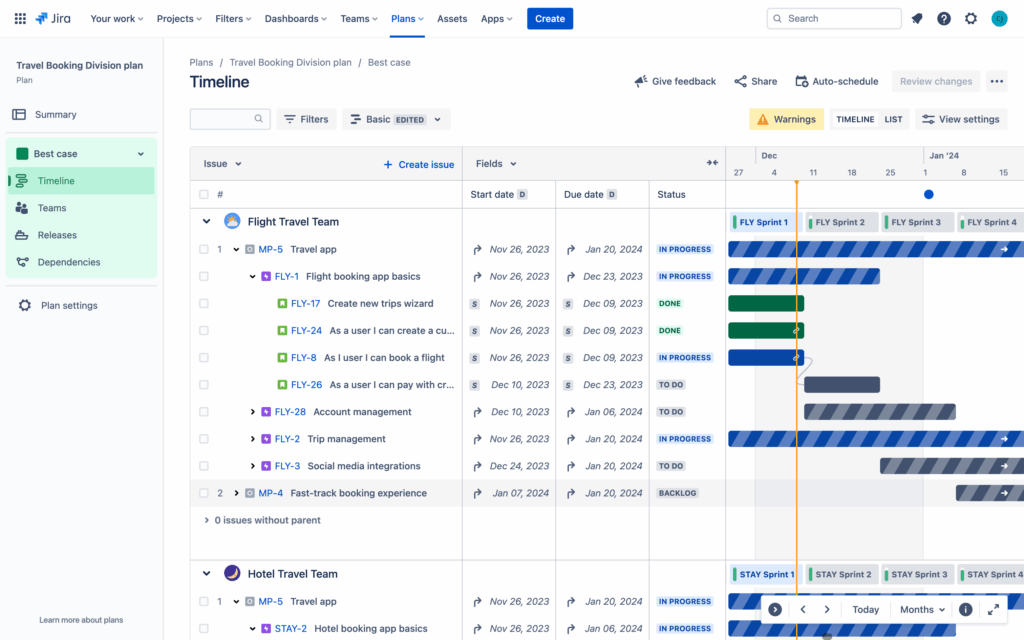
Jira Plans (Advanced Roadmaps) and Jira Timeline are Atlassian’s native planning tools. They are tightly integrated with Jira but limited when compared to dedicated Gantt apps.
Advantages
- Native UI and Seamless Jira Integration
Both tools work directly inside Jira, offering a clean, simple experience familiar to all Jira users. No additional apps or configuration needed.
- Good for High-Level Roadmapping
Teams can plan epics, releases, and team schedules without deep configuration. Plans support basic scenario planning and capacity views.
- Included With Jira (Depending on Tier)
Jira Timeline is available in Free/Standard; Jira Plans is included in Jira Premium—making them accessible without purchasing Marketplace apps.
Disadvantages
-
No true WBS hierarchy: cannot break down multi-level structures.
-
No auto-scheduling: dependencies do not adjust timelines.
-
No Critical Path: cannot analyze schedule risk.
-
Limited views: fewer zoom levels and no detailed Gantt capabilities.
-
Performance limits: up to ~5,000 issues per plan.
Pricing Plans
-
Jira Plans: Free
-
Jira Timeline: Additional 6-8 USD per user
Integrations
-
Jira Software
-
Confluence (via macros)
-
Jira Work Management (limited)
Best For
Teams that need simple, native roadmaps rather than detailed scheduling or resource planning.
Comparison Table: Best Gantt & Roadmapping Tools for Jira
The table below summarizes the key strengths, limitations, and capabilities of the leading Gantt and roadmapping tools for Jira – so you can quickly see which solution best fits your team’s needs:
| Criteria | TeamBoard ProScheduler | BigGantt | Structure + Structure.Gantt | WBS Gantt-Chart | Jira Plans & Jira Timeline |
|---|---|---|---|---|---|
| Overview | All-in-one Gantt, roadmap, and resource planner with team + portfolio views | Advanced Gantt tool with strong scheduling logic | Enterprise-level hierarchy + Gantt for PMOs | Traditional MS Project-style Gantt with WBS | Native Jira roadmapping tools |
| WBS Hierarchy | ✅ Full multi-level WBS | ✅ Good hierarchy | ✅ Best custom hierarchy (unlimited) | ✅ Classic WBS | ❌ Limited (Epic → Story only) |
| Auto-Scheduling | ✅ Yes | ✅ Best-in-class | ✅ Basic | ✅ Basic | ❌ None |
| Dependencies | ✅ Full FS/SS/FF/SF | ✅ Full | ✅ Full | ✅ Full | ❌ Basic “blocks” only |
| Critical Path | ✅ Yes | ✅ Yes | ✅ Yes | ✅ Yes | ❌ No |
| Baselines | ✅ Multiple | ✅ Single | ✅ Single | ✅ Single | ❌ No |
| Milestones | ✅ Yes | ✅ Yes | ✅ Yes | ✅ Yes | ❌ No |
| Resource Management | ✅ Strong (capacity, workload, heatmap, Generic Resources) | ❌ None | ❌ Limited | ❌ Basic only | ❌ None |
| Multi-Assignee | ✅ Yes | ❌ No | ❌ No | ❌ No | ❌ No |
| Generic Resources | ✅ Yes | ❌ No | ❌ Partial | ❌ No | ❌ No |
| View Modes | Daily → Yearly (✅) | Day/Week/Month (✅) | Depends on structure | Standard MS Project views (✅) | ❌ Limited (no quarterly/yearly) |
| Portfolio View | ✅ Yes | ❌ Limited | ✅ Best for portfolios | ❌ No | ✅ High-level only |
| Scenario Planning | ✅ Basic | ✅ Advanced | ❌ None | ✅ Basic | ❌ Limited (Jira Plans only) |
| Import/Export | ✅ Excel/PDF built-in | ❌ Add-ons required | ✅ Excel/PDF | ✅ Best MS Project support | ❌ Basic Jira export only |
| UI/UX | ✅ Modern & easy | ❌ Detailed but heavy | ❌ Complex | ❌ Outdated | ✅ Clean/simple |
| Performance at Scale | ✅ Good | ✅ Very good | ✅ Excellent | ✅ Good | ❌ Limited (5,000 issue cap) |
| Pricing | Free up to 10 users
100 – 150 USD/ Month (1,5/user) 1000 – 675 USD/ Month (0,68/user) |
Free up to 10 users
100 – 182 USD/ Month (1,85/user) 1000 – 692 USD/ Month (0,69/user |
Not free. Requires Structure and Structure Gantt
100 – 473 USD / Month (4.73/user) 1000 – 3005 USD / Month (3/user) |
Free up to 10 users
100 – 125 USD/ Month (1,25/user) 1000 – 590 USD/ Month (0,59/user) |
Jira Plans: Free
Jira Timeline: Additional 6-8 USD per user |
| Best For | Teams needing Gantt + roadmap + resources in one tool | Complex dependency-heavy projects | PMOs with multi-project governance | Traditional PMs or MS Project users | Simple roadmaps, agile teams |
Conclusion
Choosing the right Gantt or roadmapping tool for Jira ultimately depends on your team’s planning style, project complexity, and resource management needs. Each app in this comparison excels in different areas—some prioritize advanced scheduling logic, others focus on hierarchy modeling, while a few offer broader, all-in-one planning capabilities.
No tool is universally “best”, the right choice depends on your workflow, scale, and the level of control you need. By understanding the strengths and limitations of each solution, teams can select the tool that not only fits today’s needs but will also support future growth, clarity, and alignment across projects and portfolios.