
Managing projects in Jira can feel like steering a ship through busy waters. While Jira provides a strong foundation for tracking issues and managing Agile workflows, many teams still find themselves struggling with two big challenges: scheduling resources effectively and tracking time accurately. That’s where DevSamurai’s apps – ProScheduler vs. TimePlanner – come in.
Both apps extend Jira to cover gaps in project scheduling and time management, but they do so in different ways. If you’ve ever asked, “Do I need ProScheduler, TimePlanner, or both?”, this article will give you a clear comparison of their features, similarities, and differences so that you can choose the right fit for your team.
What is ProScheduler?
ProScheduler is designed to help teams visualize and manage who is working on what and when. Think of it as your project scheduling command center inside Jira.
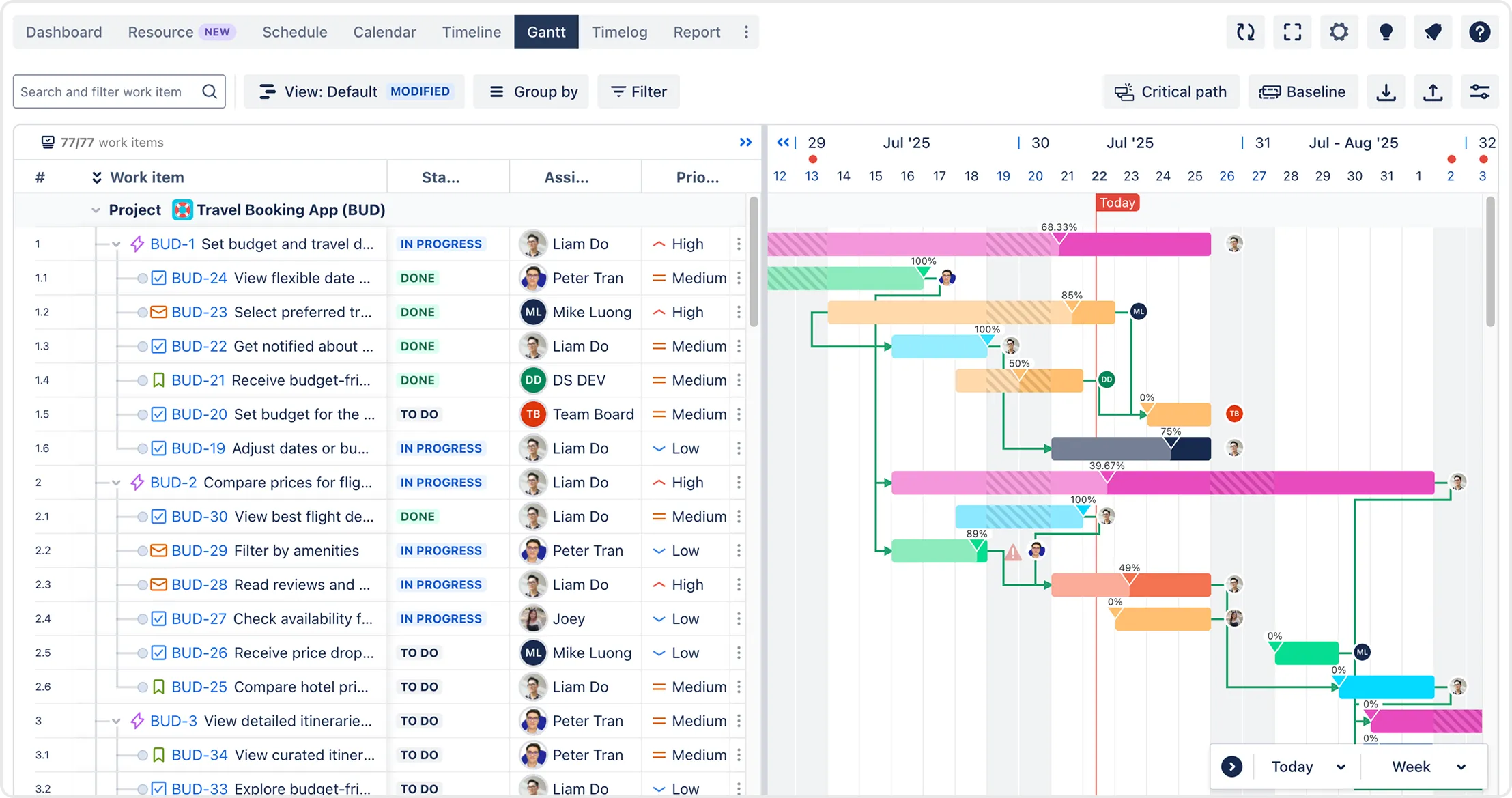
Some of its standout features include:
- Drag-and-drop Gantt charts to plan project timelines and dependencies.
- Workload management to see each team member’s availability and balance assignments.
- Resource planning across multiple projects to avoid overbooking or conflicts.
- Dashboards and reports that show project progress, bottlenecks, and workload distribution.
In short, ProScheduler is ideal if your pain point is keeping projects on track and ensuring resources are allocated efficiently.
And what about TimePlanner?
TimePlanner complements Jira by focusing on time tracking, timesheets, and cost control. While ProScheduler is about looking forward (planning workloads), TimePlanner looks backward and inward: measuring how time was actually spent.
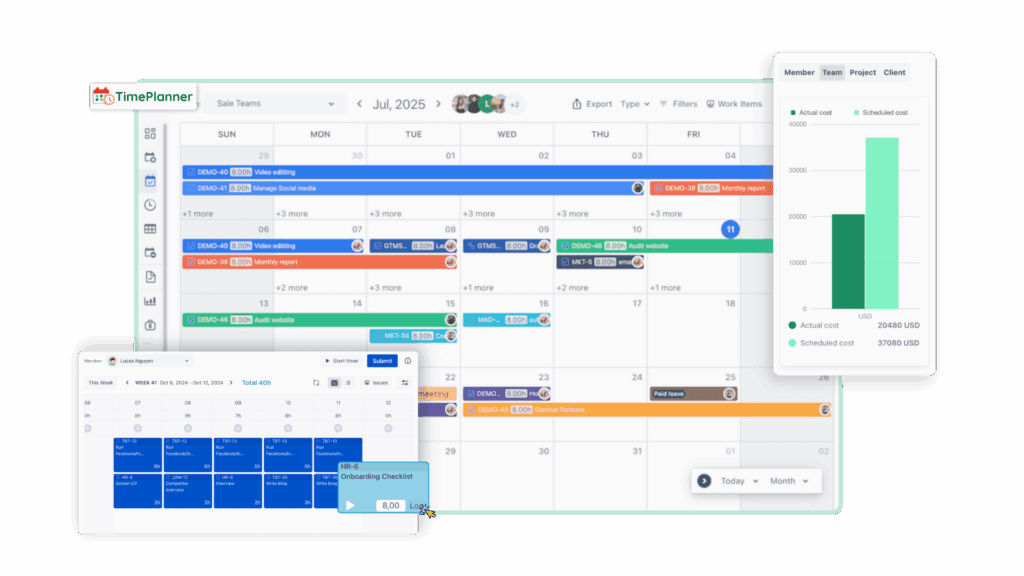
Key features include:
- Worklog management to capture accurate time entries on Jira issues.
- Timesheets that consolidate logged hours for approvals, payroll, or billing.
- Overtime, leave, and holiday tracking for better visibility into availability.
- Cost management to track billable vs. non-billable hours and project costs.
- Reports and dashboards for productivity, utilization, and client billing.
If your challenge is making sure every hour is accounted for and reported correctly, TimePlanner is the tool to rely on.
Similarities between the two apps
Although ProScheduler and TimePlanner focus on different aspects of project management, they share some common strengths that make them valuable additions to Jira.
First, both apps are Jira native, meaning teams can continue working within their existing Jira projects and workflows without the need for complex data transfers or system changes. This ensures a smooth experience and eliminates the hassle of switching between different tools.
Both tools are also designed with Agile teams in mind. This ensures that they can fit into any Agile workflow, whether your team is running short sprints or managing multiple projects simultaneously.
Additionally, their user-friendly interfaces are one of the major benefits of both apps. With minimal setup required, they are designed to be intuitive so teams can start using them right away, without extensive training or complex configurations.
Finally, both apps have strong reporting capabilities. Each provides comprehensive reports that give managers insights into performance and potential bottlenecks. These reports not only support day-to-day project management but also help leaders make strategic decisions about resources and planning.
Key differences between ProScheduler vs. TimePlanner
Since each app fulfills specific needs, there will be some minor differences between the apps’ core features. Here is the comparison between the two apps.
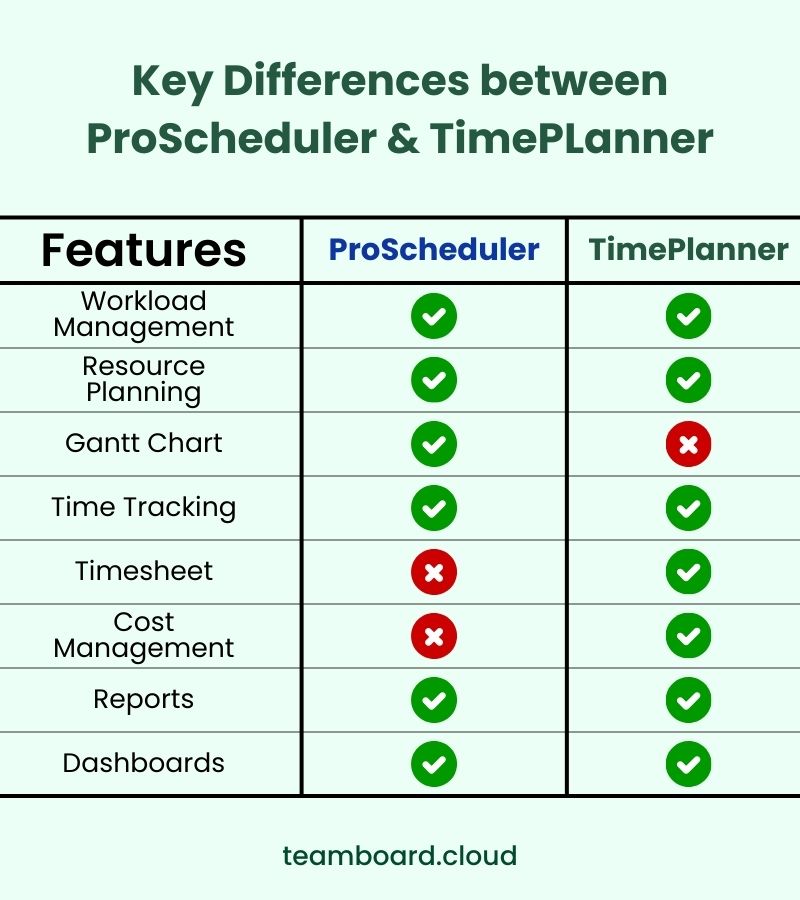
Depending on particular use cases, you can decide which app suits your team and workflow.
When to use ProScheduler
ProScheduler for Jira is ideal for teams that need a clear, visual way to manage projects and resources while maintaining flexibility. It works particularly well in situations where projects involve multiple dependencies, and teams need to quickly see who is available and when.
Besides, it is especially useful for teams that value agility and collaboration. Some teams prefer an open approach, where anyone can step in and adjust tasks, while others require a more structured setup with limited permissions.
ProScheduler supports both models. Regular users can’t change configurations, but as long as they are part of a project or team and have the appropriate Jira permissions, they can adjust plans directly.
In other words, anyone involved in the work can update timelines, move tasks, or modify dependencies without waiting for a manager.
ProScheduler is also a strong choice when teams need to:
- Balance workloads and avoid overbooking resources across multiple projects.
- Visualize timelines and dependencies with Gantt charts.
- Maintain an up-to-date view of project capacity and progress.
In summary, ProScheduler is great for teams that want to stay agile and allow multiple people to actively shape the plan as the project evolves, while still keeping a clear overview of resources and timelines.
When to use TimePlanner
Meanwhile, TimePlanner is the ideal choice for teams that need accurate time tracking, accountability, and structured control over access. It excels in situations where it’s important to know not only how much time was spent on tasks but also who is allowed to view or modify time and schedules.
One common challenge teams face is managing access levels. Giving everyone the same access can lead to confusion, mistakes, or even accidental changes to other team members’ plans.
On the other hand, overly restrictive access can slow down workflows and frustrate team members. TimePlanner addresses this with a clear and structured permission system, allowing teams to strike the right balance between accessibility and control.
1. How permissions work
App permissions are organized into three groups:
- Admin: Full control over app settings and functionalities, including configuration, reporting, and team setup.
- Viewer: Limited access for those who only need to view schedules, worklogs, or cost rates.
- Approver: Focused on reviewing and approving timesheets, leave requests, or other actions, ensuring smooth workflows without giving full administrative rights.
Meanwhile, team permissions further refine access within individual teams:
- Viewing: Team members can see schedules and worklogs of others, providing transparency without the risk of unintentional changes.
- Managing: Team members can create tasks, adjust assignments, and log time for themselves or others, giving managers and leads the ability to coordinate work actively.
2. Other use cases
When comparing TimePlanner vs. ProScheduler, the app is also particularly helpful when teams need to:
- Track actual hours spent on tasks for accurate reporting and billing.
- Monitor team utilization and productivity, identifying bottlenecks and over- or under-utilized resources.
- Maintain cost management, especially for billable projects or projects with strict budgets.
- Ensure accountability and security through structured permissions, giving the right access to the right people.
Using both apps together
The real magic happens when you combine both tools. Instead of choosing between planning and backward tracking, you can cover the full lifecycle.
You can use ProScheduler to:
- Assign tasks and balance workloads.
- Set timelines and visualize dependencies.
- Ensure no one is overbooked.
Then, you can track with TimePlanner:
- Log actual time spent.
- Compare estimates vs. actuals.
- Generate reports for billing and productivity.
By using both, you close the loop between expectations and reality. Over time, this feedback cycle improves forecasting, reduces project overruns, and enhances cost management.
Conclusion on ProScheduler vs. TimePlanner
So, which Jira app should you choose — ProScheduler or TimePlanner?
- If you need forward-looking visibility into projects and resources, ProScheduler is the answer.
- If you need accurate tracking of time, costs, and productivity, TimePlanner is your best bet.
- And if you want the full picture — planning + tracking — the combination of both creates a powerful ecosystem inside Jira.
Ultimately, both apps aim to solve the same root problem: helping teams work smarter, not harder. Whether you’re a project manager juggling multiple deadlines or a business leader focused on cost efficiency, ProScheduler and TimePlanner give you the tools to stay in control.
Ready to see the difference? Explore both apps on the Atlassian Marketplace and discover how they can transform your Jira environment.