
If your team’s estimates miss by roughly the same amount every sprint, you don’t have bad luck. You have a pattern, and the evidence is already sitting in your Jira worklogs.
Most teams treat estimating like weather forecasting: make a guess, hope for sunshine, shrug when it rains. A better approach is to use worklog data to improve estimates. Compare what you planned with what actually happened, find where the gap comes from, and feed those lessons back into the next plan.
This guide walks through five practical fixes. You’ll clean up your data, measure plan vs. actual, spot the patterns, correct new estimates, and make the habit stick. No crystal ball required, just the time your team already logs.
Why your Jira estimates are off, and why “try harder” won’t fix them
First, some comfort: you’re in good company. A review of software estimation surveys by Magne Jørgensen at Simula Research Laboratory found that projects overrun their effort estimates by around 30% on average.
Even more striking, that number has barely moved since the 1980s. Forty years of better tools, and we’re still wrong by about the same amount.
The main culprit is the planning fallacy, a bias first described by psychologists Daniel Kahneman and Amos Tversky. When we estimate a task, we picture how it should go: the happy path, no interruptions, no surprises. That’s the “inside view”. We forget how similar tasks actually went last time, when the API was flaky, and the reviewer was on holiday.
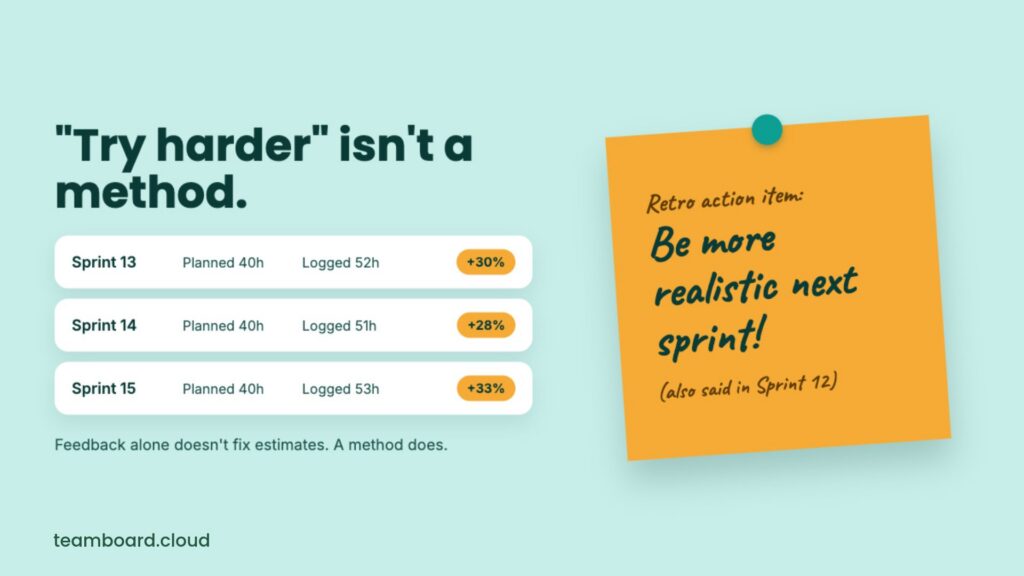
Here’s the twist that makes this article necessary. Simply knowing you got it wrong doesn’t fix it. In studies by Tanja Gruschke and Magne Jørgensen, most developers started out overconfident about their estimates. They stayed overconfident, even after repeated and immediate feedback on how far off they were.
So, telling the team “be more realistic next sprint” is like telling someone to “just relax”. Well-meant, rarely effective. What works is a method: look at the data, find the pattern, and change how you estimate. That’s where worklogs come in.
Plan vs. actual in Jira: what your worklog data already tells you
Jira’s time tracking gives you everything you need for a plan-vs-actual comparison. It comes down to three fields:
|
Field |
What it means |
Plan or actual? |
|---|---|---|
|
Original Estimate |
How long you expected the work item to take |
The plan |
|
Time Spent |
The total of all work logs on the work item |
The actual |
|
Remaining Estimate |
How much work you think is left |
The current forecast |
When someone logs time for the first time, Jira subtracts it from the Original Estimate and puts the result in Remaining Estimate. After that, every new worklog comes off the Remaining Estimate. The Original Estimate stays put as your record of the plan.
Worklogs beat gut feeling for one simple reason: each one has a date, a person, and a work item attached. That means you can group them by work type, team, component, or sprint and ask useful questions. Do bugs always run over? Does one component eat time? Is the gap growing or shrinking?
Two kinds of plan vs actual
Estimate vs logged compares the Original Estimate of a work item with the time logged on it. Scheduled vs logged compares the hours planned for a person in a period with the hours they actually logged. You need both: the first tells you if your estimates are right, the second tells you if your plans fit your people.
How to fix your Jira estimates using worklog data
Each fix builds on the one before it. Clean data comes first, because any analysis built on messy worklogs is a house of cards.
Fix 1: Stop breaking your plan vs. actual data
Before you compare anything, make sure the numbers mean what you think they mean. Run through these five checks.
- Never overwrite the Original Estimate: Atlassian’s own guidance says to estimate each work item once and leave that number alone, even when you learn it was wrong. It feels odd, but it’s the only way to keep a record of the plan. If the scope changes, update the Remaining Estimate instead.
- Log time daily, and log the real time: Worklogs typed in on Friday afternoon from memory are mostly fiction. Short, daily logs are more accurate and take less effort. The same goes for shortcuts: if your tool can log scheduled time in one click, adjust each entry to what actually happened. Logging the plan as the actual hides the exact gap you want to measure.
- Pick one rule for subtasks: Put estimates on the parent or on its subtasks, not a mix of both. Otherwise, you end up comparing apples with fruit salad.
- Track unestimated work: Bugs, support requests, and “quick favours” often get logged without an estimate. They never show up in an estimate-to-actual ratio, but they still eat the sprint. Keep an eye on what share of your logged time has no estimate.
- Know Jira’s working day: Jira treats a day as 8 working hours by default, so an estimate of “3d 4h” is 28 hours in an export. Remember this before you build a spreadsheet and wonder why the totals look strange.
Fix 2: Measure plan vs. actual
With clean data, you can start measuring. You can get surprisingly far with what Jira gives you out of the box.
Jira has a built-in field called workratio. It shows time spent as a percentage of the Original Estimate:
\text{workratio} = \frac{\text{Time Spent}}{\text{Original Estimate}} \times 100A workratio of 100 means the work took exactly as long as planned. 150 means it took 50% longer. You can use it straight in JQL:
project = WEB AND resolved >= -30d AND workratio > 100That finds every work item resolved in the last 30 days that ran over its estimate. A few other useful queries:
issuetype = Bug AND resolved >= -90d AND workratio > 150finds bugs that took at least 50% longer than planned.statusCategory != Done AND workratio > 80finds open work that has already used 80% of its estimate, so you can step in before it overruns.originalEstimate is EMPTY AND timespent > 0finds work with time logged but no estimate.
The Time Tracking Report (Project › Reports) is the other built-in option. It lists original estimates, time spent, and remaining time for the work items in a fix version, plus an Accuracy figure for each one.
Both tools have limits worth knowing:
- workratio doesn’t include time logged on subtasks.
- The Time Tracking Report works per fix version, and it isn’t available in team-managed projects.
- workratio only uses Jira’s native time tracking fields, so check how your time tracking app stores worklogs.
Fix 3: Find where your estimates go wrong
A single team-wide number, such as “we overrun by 25%”, is a start. But overruns are rarely spread evenly. The real insight comes from slicing the data.
Group your work ratio or scheduled vs. logged figures by:
- Work type: stories, bugs, spikes, and tasks often behave very differently.
- Team or component: one legacy module may be the time sink that drags everything else down.
- Estimate size: small tasks often overrun by a bigger percentage, while big ones hide bigger gaps in hours.
Then look at the range, not just the average. An average of 1.2 can hide work items that took half the time and others that took three times as long. The range tells you how much buffer you really need.
Here’s what the result might look like for one team. The numbers are an example, not a benchmark:
|
Work type |
Work items reviewed |
Median actual ÷ estimate |
Typical range |
|---|---|---|---|
|
Story |
64 |
1.2 |
0.9 to 1.6 |
|
Bug |
41 |
1.6 |
0.8 to 3.0 |
|
Spike |
9 |
2.0 |
1.2 to 3.5 |
In this example, stories are close to the plan, bugs are a gamble, and spikes take about twice what anyone admits in planning. That’s three different problems with three different fixes.
When you spot a big gap, ask why before you blame the estimate. Common reasons include a Remaining Estimate nobody updated, work that was rescheduled or left half done, and people who simply had less time than the plan assumed. Unplanned interruptions and forgotten subtasks are regulars on this list too.
Besides, you should also check for overtime. If someone logs 50 hours in a 40-hour week to hit a deadline, the estimate can look spot on while the plan was anything but.
Fix 4: Use worklog data to improve new estimates
Now comes the part that actually changes your next sprint: turning patterns into better numbers.
The method has a name: reference class forecasting. Daniel Kahneman called it the single most important piece of advice for making forecasts more accurate. Instead of building an estimate only from the task in front of you, you start from how similar past work actually went.
In Jira, that looks like this:
- Pick the reference class. Find similar completed work: same work type, same team, and a similar size.
- Take the median and the range. Use the median actual ÷ estimate ratio from Fix 3, plus its typical range.
- Start from the baseline. If your gut says 10 hours for a bug, and bugs run at 1.6 times their estimate, your starting point is 16 hours.
- Adjust for what’s truly different. If this bug really is simpler than usual, adjust down. But be honest: “this one is different” is the planning fallacy’s favourite sentence.
Where you can, share a number plus a range: “about 16 hours, likely 10 to 24”. Stakeholders may grumble at first, but a range set at the start beats an apology at the end. Once you correct an estimate, put it where it matters.
Fix 5: Make it stick with a monthly plan vs. an actual review
Remember the research on feedback? Looking at the numbers alone didn’t change much. A structured review with the team is what makes the difference.
In a 2018 study, Antonio Vetrò, Magne Jørgensen and colleagues analysed the accuracy of an agile team’s past sprint estimates and discussed the findings with the team in retrospectives. When the new process was applied to the next project, the researchers measured an improvement in estimate accuracy from 10% to 45%. Same people, better process.
Keep the review short and regular. A 20-minute monthly slot is enough to:
- Look at the five biggest overruns of the month and their causes.
- Compare ratios by work type with last month.
- Agree on one change to how you estimate, such as “add a review buffer to every bug”.
- Check next month whether it worked.
Keep the focus on team patterns, not individual scorecards. Research by Gruschke and Jørgensen found that feedback about other people’s estimates led to more realistic judgements than feedback about one’s own. Ranking people by work ratio does the opposite: it teaches them to pad estimates or to log time to match the plan. Then your data goes out the window, and you’re back to square one.
How TimePlanner helps you fix Jira estimates with worklog data
You can run all five fixes with Jira and a spreadsheet. But if you’d rather not spend Monday mornings wrestling with exports, TeamBoard TimePlanner keeps the plan, the worklogs, and the comparison in one place inside Jira.
- Plan from your estimates: Sync the schedule with Jira’s Original Estimate and Time Remaining fields, and let TimePlanner turn each estimate into daily hours on the Schedule Board.
- Log time where the work is: Start a timer from the Jira work item, log hours on the weekly Timelog board, and record events and non-Jira tasks too, so unplanned work doesn’t vanish from the picture.
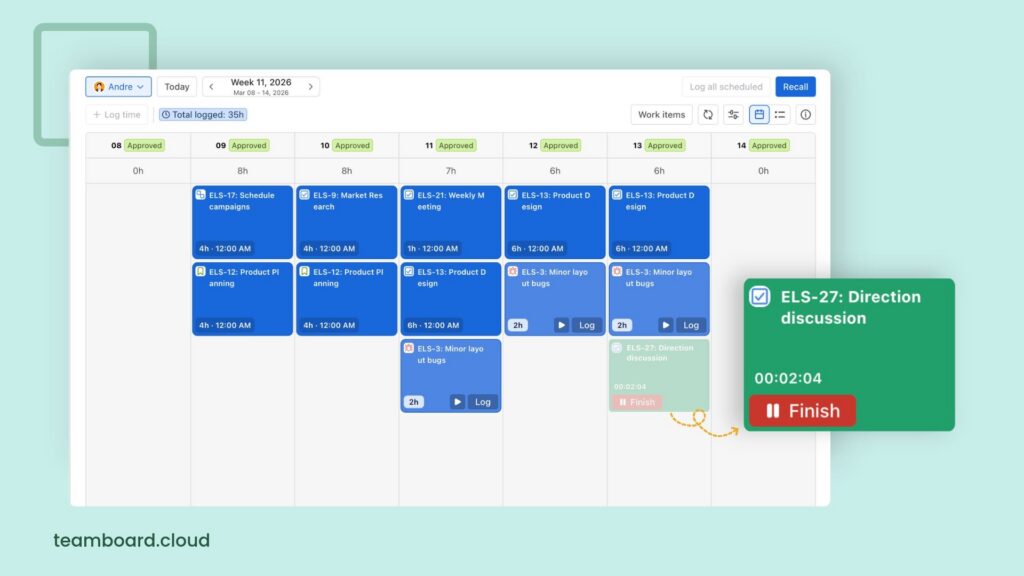
- Check the data before you trust it: Team members can use TimePlanner to submit their timesheets for Jira, and approvers review them, so your plan vs. actual reports are built on reviewed numbers.
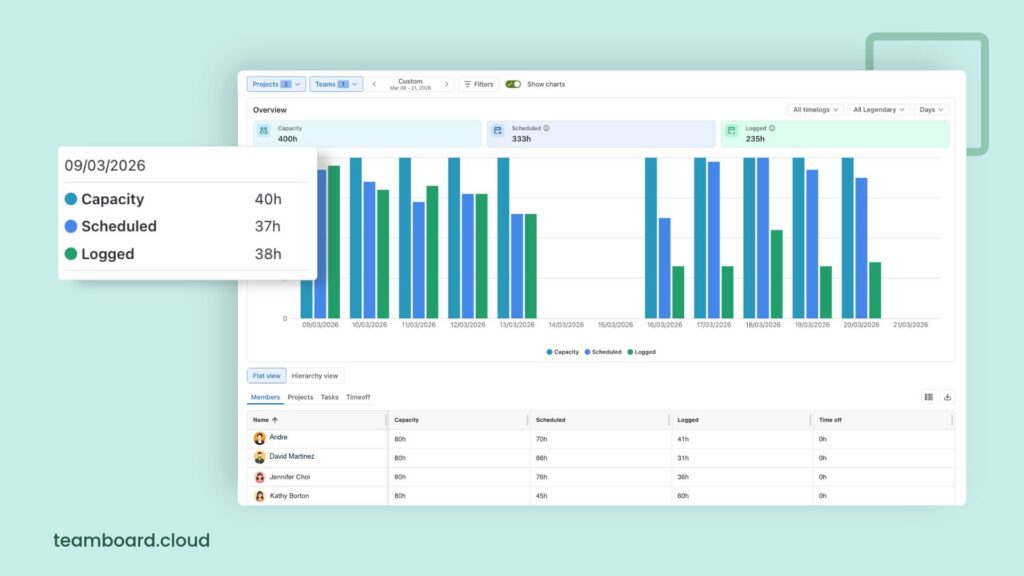
- Compare plan vs. actual: Generate different types of reports to see scheduled vs. logged time, overtime, undertime, and utilization by project, person, or period. Filter the Logged Time Report by work type, status, or priority, and export it to Excel when you want to dig deeper.
Mistakes that keep Jira estimates broken
If your estimates refuse to improve, one of these is usually behind it:
- Editing the Original Estimate: It rewrites history, and your plan vs. actual comparison quietly becomes actual vs. actual.
- Logging the plan instead of the actual: One-click logging is handy, but only if you correct each entry to the real time.
- Ignoring unestimated work: If half your bugs have no estimate, half your overrun is invisible.
- Averaging everything together: One team-wide ratio hides the bugs and spikes that cause most of the trouble.
- Turning the data into a scorecard: Rank people by accuracy, and they’ll pad their estimates until the numbers look great and mean nothing.
- Reviewing once and calling it done: Estimation habits drift back. A short monthly review keeps them honest.
Start with last sprint’s worklogs
Fixing your Jira estimates doesn’t take a new methodology or a weekend workshop. Keep your data clean, measure plan vs. actual, find where the gaps come from, start new estimates from past actuals, and review the results as a team.
You don’t need a year of history to begin. Pull last sprint’s worklogs, run one workratio query, and see what jumps out. Chances are you’ll learn more in ten minutes than in ten rounds of planning poker.
Frequently asked questions
How do I fix inaccurate estimates in Jira?
Start by comparing plan vs. actual. Keep the Original Estimate unchanged, log time daily, and use the workratio field or a plan vs actual report to see where the gaps are. Then group the results by work type, correct new estimates using past actuals, and review the numbers with your team once a month.
How does worklog data improve estimates?
Worklogs show how long similar work actually took. When you use that history as the starting point for new estimates, instead of relying on gut feeling alone, your estimates move closer to reality. This approach is called reference class forecasting.
What is workratio in Jira?
Work ratio is a built-in Jira field that shows time spent as a percentage of the Original Estimate. A value of 100 means the work took exactly as long as planned. You can search with it in JQL, for example, workratio > 100 to find work items that ran over their estimate.
Should I change the Original Estimate when the scope changes?
No. Keep the Original Estimate as your record of the plan, and update the Remaining Estimate instead. If you overwrite the Original Estimate, you lose the ability to compare plan vs. actual.
Can I compare planned and logged hours per person, not just per work item?
Yes, but Jira’s built-in reports focus on work items. With TeamBoard TimePlanner, you can compare scheduled and logged time for each person, team, or project, along with overtime, undertime, and utilization.